
Software migration · Data portability
What Data Should You Export Before Changing Study Library Software?
Preserve more than a member list: keep identifiers, relationships, history, financial evidence, attachments, configuration and the proof needed to understand what the records mean.
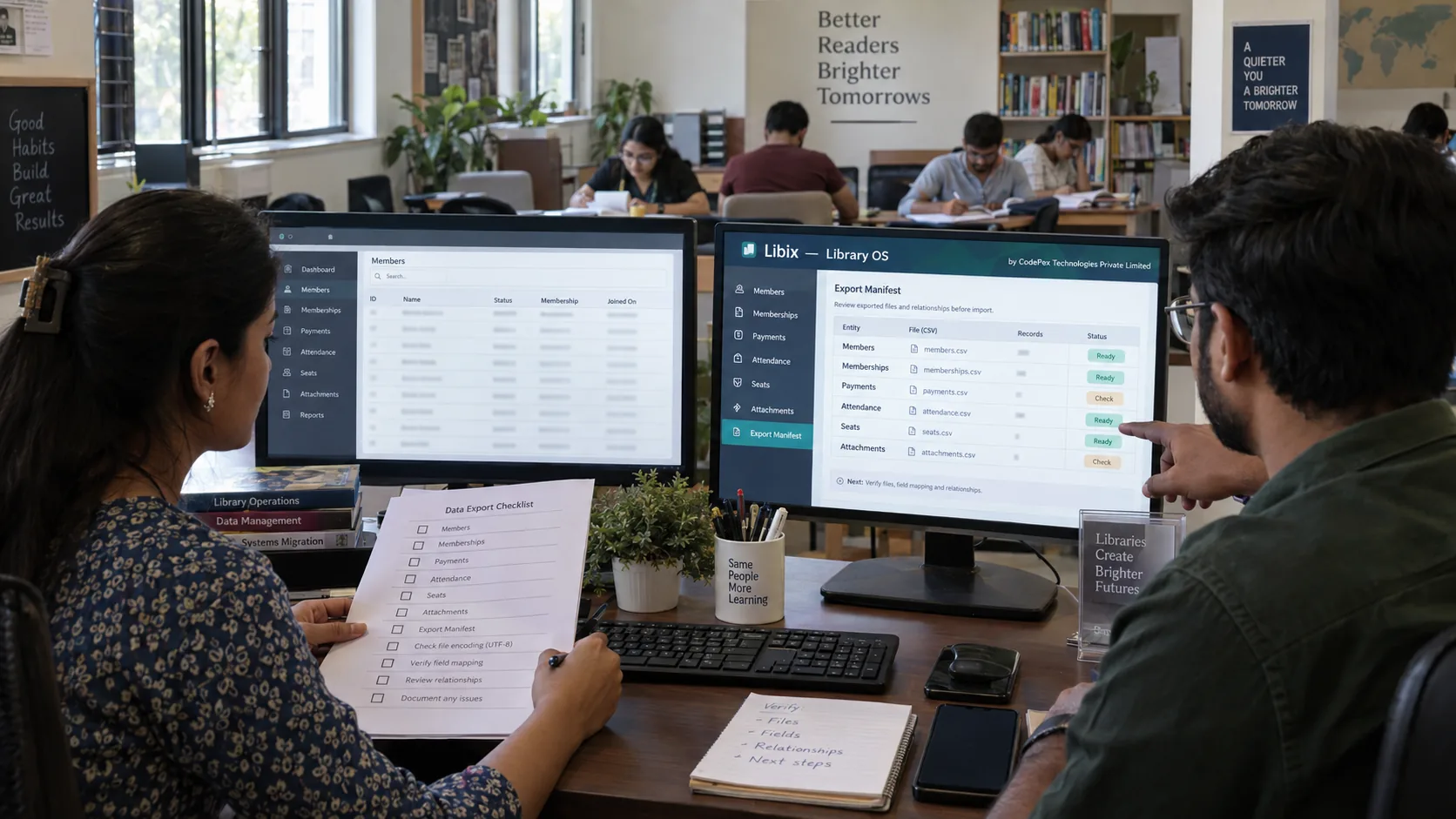
Quick answer
Before changing study-library software, export the records required to understand who members are, what memberships they held, how those memberships changed, where and when seats were allocated, what attendance occurred, what was charged and paid, what remains due, what was refunded, and which documents or operational evidence belong to each record. Export before access ends, and verify before trusting the files.
Identity
Members, admissions, staff, users and branches
Relationships
IDs connecting members, plans, memberships, allocations and payments
History
Renewals, attendance, payments, refunds, changes and statuses
Evidence
Attachments, reports, configuration, audit and export manifest
Why export before exit?
A system may contain visible current records, historical events, relationships, attachments, configuration, audit evidence, identifiers and metadata. A convenient Members.csv or Backup.zip may expose only some of those layers. Preserve the package before a subscription ends, authentication changes or support access becomes uncertain.
Define scope and access first
For every domain, classify it as required for migration, required as archive or evidence, optional, not required or unknown. Record the subscription end date, login end date, export availability, API and attachment access, report access, support arrangements, possible read-only access and MFA dependencies. These dates may not be identical.
Domain-by-domain export inventory
Members and admissions
Preserve legacy IDs, member numbers, legitimate contact fields, status, branch, dates, enquiry references and admission context where in scope.
Plans and memberships
Export plan definitions separately from memberships; retain plan IDs, effective dates, membership IDs, start/end dates, status and lifecycle state.
History and capacity
Keep renewals, freezes, extensions, cancellations, seats, zones, allocations, shifts and attendance at the granularity actually available.
Financial evidence
Separate charges, invoices, payments, allocations, receipts, dues, refunds, reversals and current opening position. A total is not a transaction ledger.
People and authority
Export staff, users, branches, roles, permissions and scope. Never export reusable plaintext passwords.
Documents and meaning
Download actual attachments, preserve entity references, inventory settings, custom fields, lookups, integrations, schema and report filters.
Preserve history, IDs and relationships
Current expiry is not renewal history. A current seat is not allocation history. Attendance totals are not attendance events. A payment total is not payment allocation. Keep source IDs, foreign or reference IDs, external IDs, branch IDs, transaction IDs and document references. Preserve created, updated, effective, start/end, transaction and cancellation timestamps together with statuses.

Attachments, configuration and evidence
Inventory actual files, not just file references: preserve source file ID, entity ID, filename, type, timestamp and mapping. Document branch settings, numbering, membership rules, late fees, attendance, seat and shift rules, locker rules, notifications, taxes where relevant and invoice or receipt numbering. Export custom-field definitions, allowed values and option IDs; values without definitions can lose meaning.
Preserve report names, filters, periods and generated timestamps as evidence, but remember a report is not raw data. Inventory integrations by type, purpose, scope, external IDs and owner without placing API keys or passwords in the general package.
Build and verify the export manifest
For each file record an export ID, domain, filename, format, timestamp, source scope, filters, expected and actual count, date range, IDs, attachments, verification status and notes. Compare counts against the selected filters, inspect earliest and latest dates for truncation, check relationship orphans, and privately spot-check a long-term member, a renewal, a dues case, a refund, a seat change, an inactive record and a locker where relevant.
Record what was checked and what remains unknown.
Record what was checked and what remains unknown.
Record what was checked and what remains unknown.
Record what was checked and what remains unknown.
Handle missing data without guessing
Classify gaps as another export, API extraction, vendor assistance, database extraction, report or PDF evidence, attachment-only, unavailable or unknown. Escalate before exit: ask for alternate exports, attachment access, field definitions, API scope and post-cancellation access. Do not silently accept unknown data or reconstruct history at the export stage.
Secure the immutable package
Keep an untouched raw copy, manifest, documentation, reports, attachments and gap notes. Transform copies later. Use appropriate access controls, storage protection and secure transfer; maintain a backup and follow the organization’s retention and disposal policy. Never share the package casually, and never place reusable plaintext passwords or API secrets in it.
Where Libix fits
Verify the destination separately
Libix capabilities and import formats must be checked against current approved documentation. Verify support for members, plans, memberships, history, seats, allocations, shifts, attendance, charges, payments, receipts, opening balances, refunds, lockers, staff, roles, branches, attachments, custom fields, APIs and migration assistance. This page establishes export readiness; the migration guide owns transformation, test imports, reconciliation, cutover and decommissioning.
Continue to migration planningExit-readiness planner
Build the export package before you exit
This local planner uses fictional labels only. It does not upload files, store data, inspect credentials or calculate a completeness percentage.
1. Domain inventory and status
2. Relationship readiness
Rows are not enough; preserve keys that explain how records connect.
3. Export manifest entry
Manifest fields: domain, format, scope, filters, count, date coverage, IDs, attachments, verification status and notes.
4. Readiness gate
- Source access window is not confirmed
- Immutable raw exports are not preserved
- Attachments are not confirmed
- Relationship keys are not checked
- Date coverage is not checked
- Counts are not checked
- Private spot checks are not complete
- Gaps are not documented
- Secure package storage is not confirmed
Frequently asked questions
What should I export before changing study-library software?
Review members, admissions, plans, memberships, lifecycle history, seats, allocations, shifts, attendance, charges, payments, allocations, receipts, dues, refunds, lockers, staff, roles, branches, attachments, audit evidence, configuration, custom fields and integrations according to your scope.
Is a backup enough?
Not necessarily. A backup may restore the source system but may not be usable as a portable, inspectable package. Where appropriate, preserve both a backup and structured exports.
Is CSV enough?
A CSV can be useful but may omit relationships, history, attachments, definitions or configuration. Verify what each export actually contains.
Should I cancel the old software after downloading files?
Do not use download completion as the cancellation rule. Verify domains, identifiers, relationships, date ranges, counts, attachments, gaps and secure storage first, then plan migration and decommissioning separately.
When does migration planning begin?
Migration planning begins after a complete, verified and preserved source export package exists. Transformation, mapping, test imports, reconciliation and cutover belong to the migration process.
Can Libix import every format?
No universal compatibility claim should be made. Verify current Libix import formats, supported fields, attachments, history, opening balances and migration assistance against approved product documentation.