
What time windows does the library sell?
Operators need consistent names, start times and end times before a seat can be discussed by shift.
Libix view: Review the shift setup and timing view, then confirm the window that applies to the member.
For morning, evening and full-day operators
Configure time windows and understand capacity by shift before a member receives an answer. Libix keeps shift, seat, membership and attendance context close to the decision.
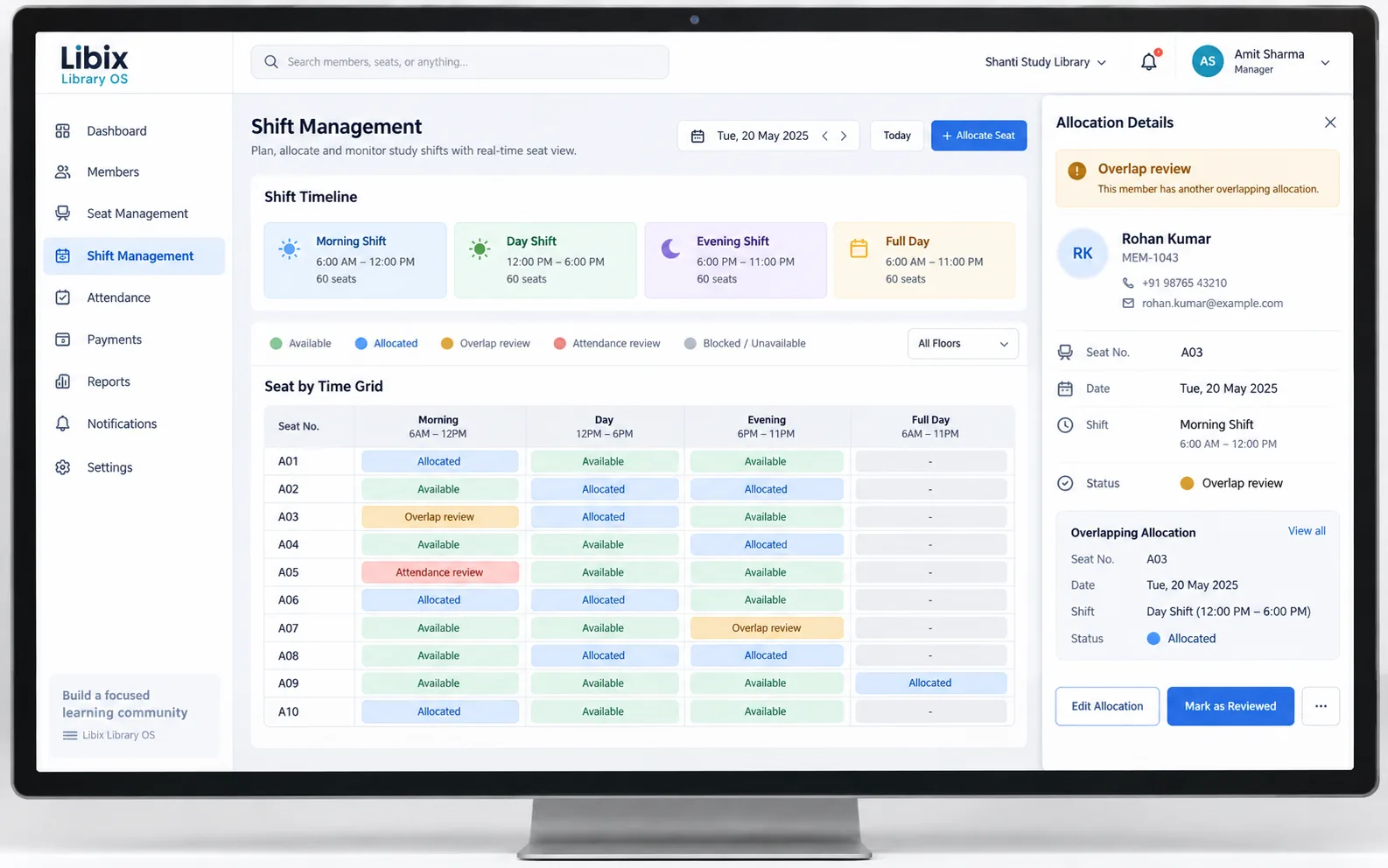
The handover moment
A morning member leaves, an evening member arrives and a full-day plan needs special care. The staff decision is not just “is the desk empty?” It is whether the date, shift, seat, membership and attendance context agree.
Focused interface view
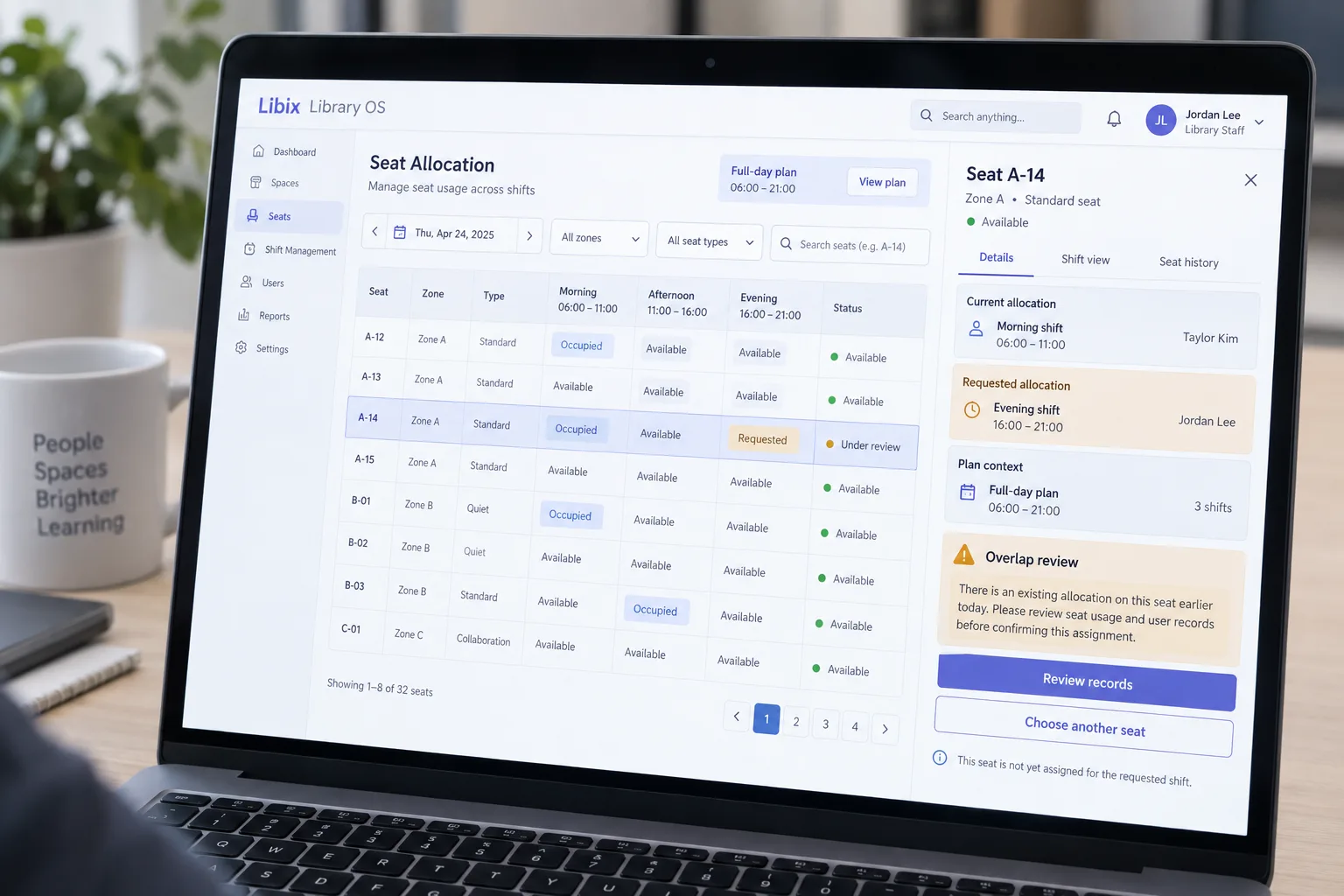
The decisive view brings the selected seat, shift, member and existing allocation into one review. The operator remains responsible for the next step: inspect records, edit the allocation or choose another seat.
How the work fits together
A shift is useful when staff can connect its timing to the physical seat, the member’s access context and the record that needs review.
01
Set the operating vocabulary staff and members use for morning, daytime, evening or full-day access.
02
Read the available seat context for the selected date and shift instead of treating total seats as one number.
03
Connect the seat, member, membership and requested time window before confirming an allocation.
04
Keep a competing allocation visible and decide whether to review, edit or choose another seat.
Capabilities by question
Occupancy is not a single number. It changes with the selected shift, seat relationship, allocation and actual attendance.
Operators need consistent names, start times and end times before a seat can be discussed by shift.
Libix view: Review the shift setup and timing view, then confirm the window that applies to the member.
Total physical seats do not explain how many seats are available for one selected period.
Libix view: Use the shift and seat context together, with a clear definition of available, allocated and under review.
A morning allocation, evening request and full-day plan can relate to the same physical seat.
Libix view: Inspect the date, seat, member and existing allocation before staff choose the next action.
Allocation records and attendance records explain different parts of the operating day.
Libix view: Keep the selected shift, seat and member context available for later review without inferring attendance from allocation.

Product-in-use walkthrough
Morning record
Taylor’s morning allocation remains visible against the date and seat rather than disappearing at handover.
Evening request
Jordan asks for the same desk in the evening window. Staff review the request against the seat and membership context.
Full-day context
A full-day plan is considered across the broader access period before staff confirm or choose another seat.
Fit and decision criteria
Can your team define and explain the morning, daytime, evening and full-day periods without ambiguity?
Can staff see when a morning allocation and evening request relate to the same physical seat?
Can the team review actual presence without treating an allocation as proof of attendance?
Connected Libix modules
Memberships describe access context. Seats describe the physical resource. Shifts describe the time window. Attendance records what happened in practice, while fees and collections answer financial questions. Review the broader study-library management solution, the seat-management page or return to the Solutions hub.
Questions for evaluation
Your operating day can be discussed as named time windows such as morning, daytime, evening or full-day. Confirm the supported setup, edit and access behavior for your current Libix plan in a demo.
The useful control is visibility before confirmation: review the date, seat, member and existing shift records when an overlap is detected. Staff should inspect the records and decide the next action rather than assume an automatic resolution.
A physical seat may support separate allocations when the time windows and operating rules do not conflict. Review the seat-by-time relationship and the member records before confirming the second allocation.
No. Allocation and attendance answer different questions. A member may have an allocation without being present, so attendance should remain a separate record used for the relevant review.
A full-day plan needs to remain visible as a wider access context while staff review the shorter time windows around it. Ask for the exact representation and overlap behavior in the current product.
Bring your actual opening hours, morning and evening plan names, a shared-seat example, a full-day plan and one overlap case. This gives the team enough context to demonstrate the decisions your staff make.
See the shift workflow
Walk through your shift names, opening hours, shared seats, full-day plans and attendance questions with the people who manage your study library.
CodePex Technologies Private Limited · Verify current capabilities and terms with the product team.