
How should seats be organized?
Seat identity and zone context give staff a stable vocabulary for the physical study space.
Libix view: Review the supported zone and seat configuration before assigning a member.
For operators allocating fixed or shared seats
See which seats are available, occupied or assignable in a chosen shift. Libix brings zone context, member assignment, conflict review and allocation history into a clearer seat-level workflow.
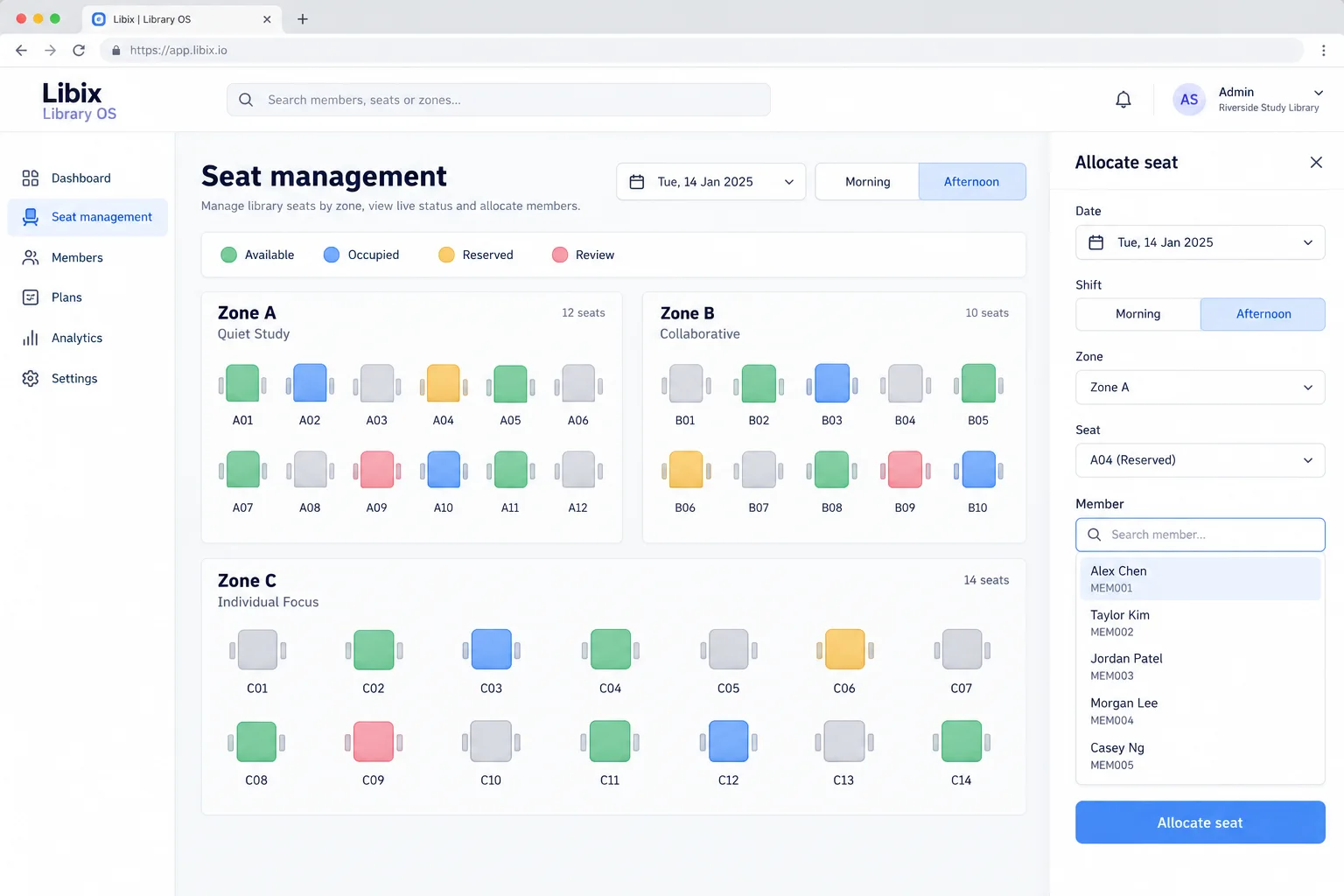
The allocation moment
A staff member needs to choose a seat for the afternoon shift. The member-facing answer depends on the date, zone, seat status, shift, existing allocation and the operator’s decision.
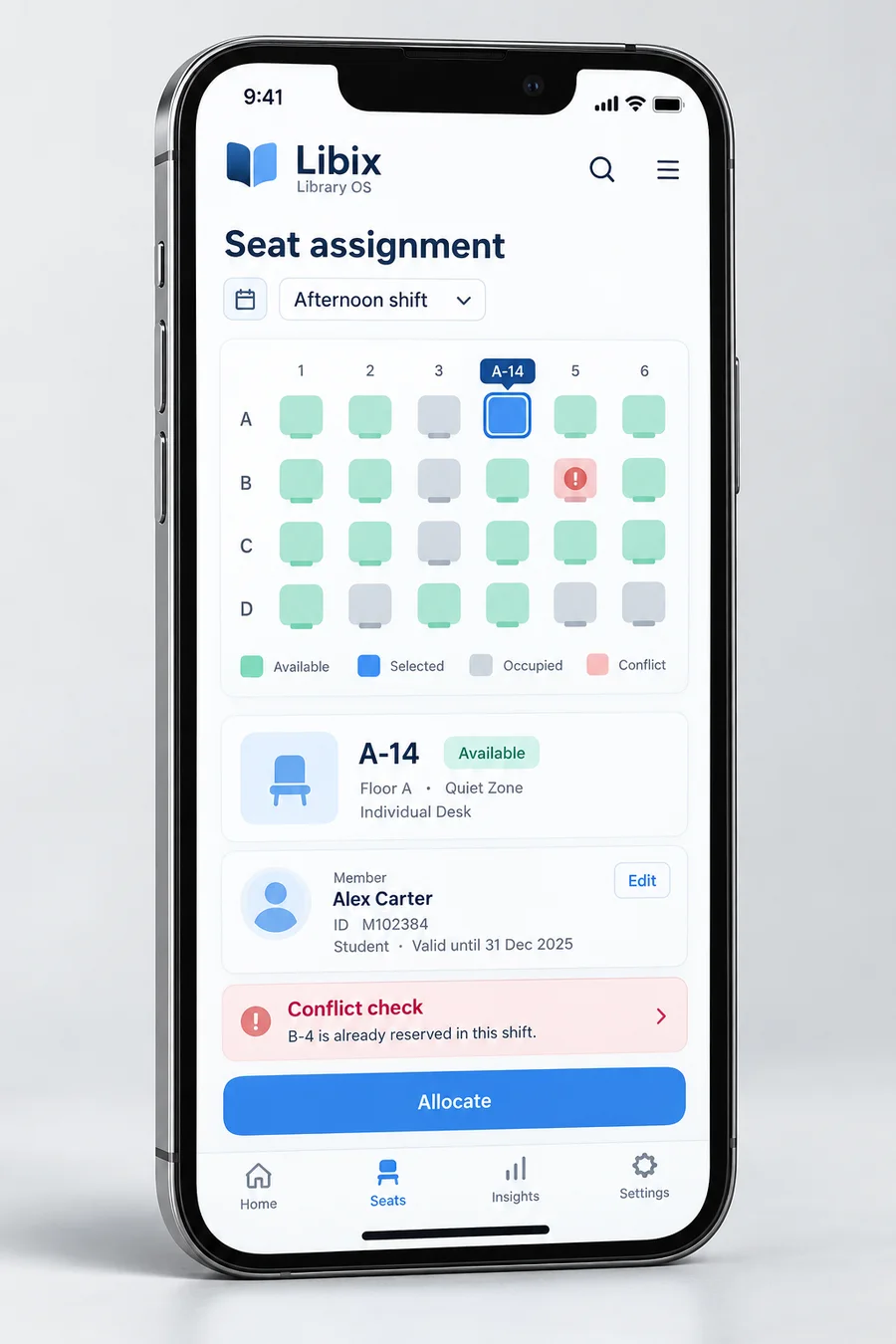
Focused interface view
A staff member should be able to see the selected seat, member, shift and any conflict context before confirming the next action. Verify the current device support, permissions and correction behavior in a product demonstration.
How the work fits together
The stages below keep seat, zone, shift and member context connected while leaving conflict resolution with staff.
01
Define seat and zone identity
02
Choose date, shift and availability
03
Review the member context
04
Inspect overlap before confirming
05
Leave the allocation traceable
Capabilities by question
The strongest view is not a colorful grid alone; it is the relationship between physical seat, time window and member record.
Seat identity and zone context give staff a stable vocabulary for the physical study space.
Libix view: Review the supported zone and seat configuration before assigning a member.
Availability depends on the chosen date, shift, zone and current allocation context.
Libix view: Use the status view with an explicit definition of available, occupied, reserved and review.
An assignment connects a member or membership context to a physical seat and access period.
Libix view: Confirm the member, shift and seat before recording the operator’s decision.
A conflict deserves inspection rather than a silent overwrite or an assumed automatic resolution.
Libix view: Review the conflicting date, shift, seat and member records and choose the next action.
Allocation history helps explain why a seat appears occupied, released, reserved or under review.
Libix view: Verify the history and correction path available to your staff.

Product-in-use walkthrough
Use this walkthrough in a demonstration:
Morning context
A-14 has an earlier allocation in the morning window; that record remains part of the decision.
Afternoon request
Alex requests A-14 for the afternoon. Staff choose the shift and review availability rather than overwriting the earlier context.
Conflict outcome
If another reservation exists, the conflict stays visible and staff choose the next action.
Fit and decision criteria
Can every physical seat be named, located and recognized consistently by staff?
Can the team see an overlap before a member receives a contradictory answer?
Can staff explain what changed and who needs to review it when an allocation is corrected?
Connected Libix modules
Seat identity gives the physical anchor. Shifts provide the time window. Memberships provide access context. Attendance and collections answer different questions about what happened. Review the broader study-library management solution or return to the Solutions hub.
Questions for evaluation
A seat may be evaluated across separate shifts when the operating rules allow it. Confirm the seat, shift, membership and attendance relationship in a demonstration before treating a shared allocation as valid.
A useful conflict workflow makes the relevant date, shift, zone, seat and member context visible before staff confirm an allocation. Ask the product team to demonstrate reserved, occupied and review states for your rules.
Zone context can help staff discuss quiet, window, floor or other local areas. Verify the current configuration and naming workflow against how your study library is arranged.
Allocation history is an important question when a seat changes across members or shifts. Confirm the supported history, correction and access behavior in the current product.
No. Availability, allocation and attendance are different concepts. A seat can be allocated without a member being present, so define the question before interpreting the record.
Bring a morning allocation, an afternoon request for the same seat, one reserved seat and one conflict case. Check whether staff can explain the next decision from the visible records.
See the seat workflow
Walk through zones, availability, morning and afternoon assignments, conflict handling and allocation history with the people who manage your seats.
CodePex Technologies Private Limited · Verify current capabilities and terms with the product team.