
Which plan is active?
Staff need a clear plan name and member profile before answering access questions.
Libix view: Open the member record and review the plan, status and associated operating context.
For staff handling plans and member status
Follow a membership from activation to expiry and renewal context without losing the member, plan, period or seat relationship. Libix gives reception a clearer record to review when a member enrolls or changes plans.
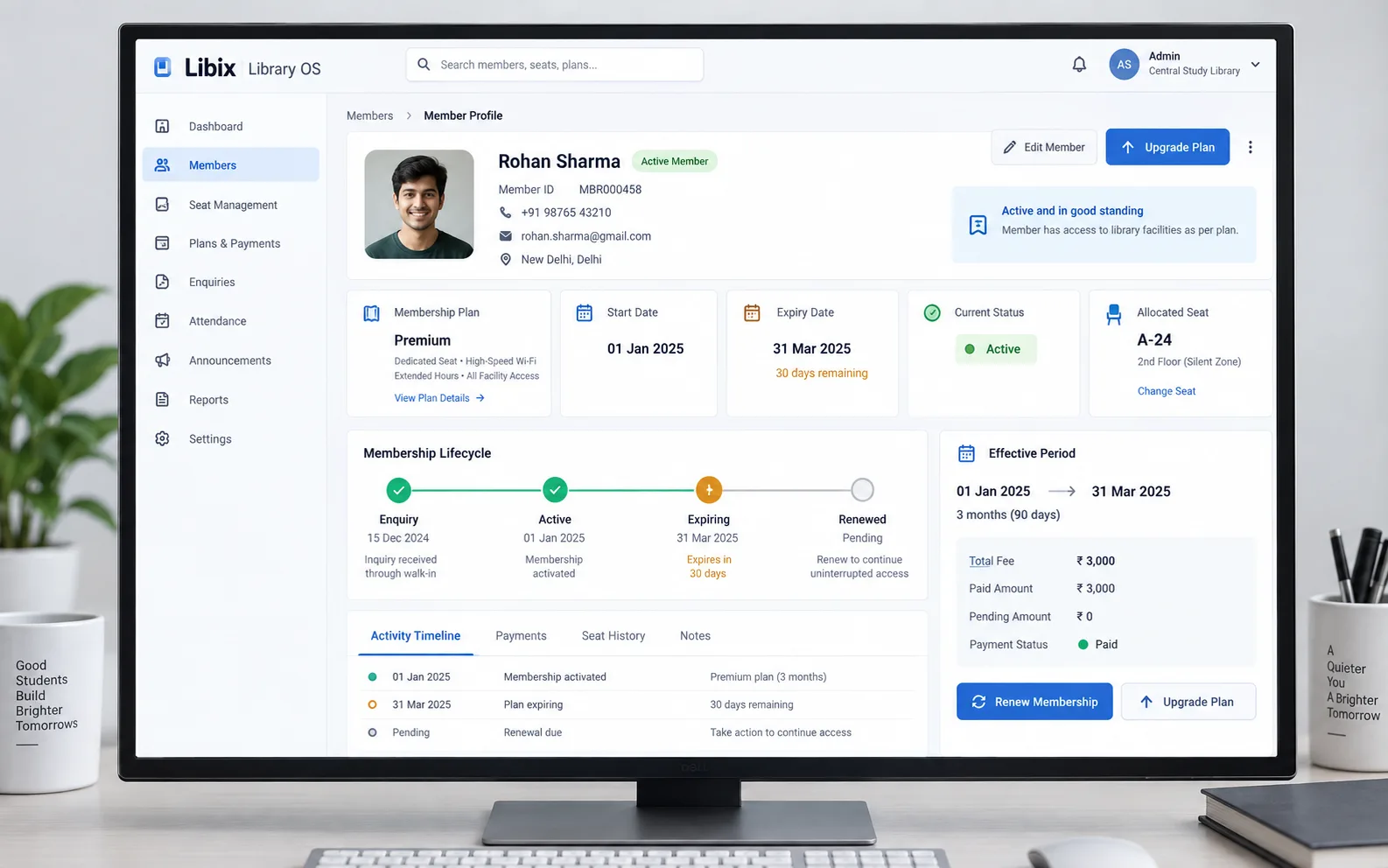
The plan-change moment
A member upgrades a plan and the receptionist checks its effective period and seat association. The member-facing answer depends on the plan, dates, current status and physical access context agreeing with one another.
Focused interface view
The decisive view keeps the old plan, new plan, dates, seat and review status together. Staff can check what the member will see instead of treating an upgrade as a single-field edit.

How the work fits together
Plans, dates, member identity, status and renewal context should support the same staff conversation rather than force reception to reconstruct it from separate notes.
01
Select the membership arrangement that matches the member’s access and operating context.
02
Review the effective start and expiry dates before the plan becomes the record staff rely on.
03
Keep the member profile, seat relationship and current status visible together.
04
Identify active, expiring, changed or renewal-related records and decide the next staff action.
Capabilities by question
A lifecycle view helps staff know whether the next step is enrollment, correction, member communication or renewal review.
Staff need a clear plan name and member profile before answering access questions.
Libix view: Open the member record and review the plan, status and associated operating context.
An upgrade or new enrollment can change the period that the member and reception team understand.
Libix view: Check the effective start and expiry dates before saving or communicating the change.
A plan conversation often reaches the physical seat or shift the member expects to use.
Libix view: Review the seat association alongside the membership rather than keeping the records disconnected.
Active, expiring, changed and renewal-related records lead to different staff conversations.
Libix view: Use the visible status and date context to decide who needs attention next.
A membership may be approaching expiry without the renewal decision being completed.
Libix view: Keep expiry context available and route the renewal question to the supported renewal workflow.

Product-in-use walkthrough
Use this walkthrough to discuss the staff decisions your own membership process needs to support:
Member profile
Priya Nair is associated with seat A-14 and asks to move from a monthly plan to a premium plan.
Period review
The receptionist checks the new effective start and expiry dates before explaining the change.
Status and next step
The record remains clear about its review state and the next decision, without assuming payment or renewal is complete.
Fit and decision criteria
Can staff explain the plan’s effective start, expiry and current status without checking separate notes?
Can the team review an upgrade or correction before it changes what the member expects?
Can membership status be discussed alongside the associated seat or shift when that relationship matters?
Connected Libix modules
The member profile is the person context. The membership is the plan and period context. Seats and shifts describe physical access, attendance describes actual presence, and fees describe the financial record. Review the broader study-library management solution, the seat-management page or return to the Solutions hub.
Questions for evaluation
A membership record should make the plan, effective start and expiry period visible. Confirm the exact plan-period setup and editing behavior for your current Libix workflow in a demonstration.
Review the member status and expiry context together, then decide which members require staff follow-up. Ask the product team to show the current expiry review and filtering behavior rather than relying on an assumed alert.
Seat association can give reception a physical operating context alongside the member and plan. Verify how changes, shared seats and shift relationships are handled in the current product.
Staff should review the old plan, new plan, effective start, expiry date and any seat relationship before saving the change. The membership record should show the resulting status clearly.
No. A member can have an active period and a payment record that still needs review, or a payment record without the access context you expected. Keep the two questions separate.
Membership management provides lifecycle context. Renewal follow-up has its own operational detail, so confirm the supported handoff and use the dedicated renewal workflow when it is available.
See the membership workflow
Walk through member profiles, plans, periods, seat associations, lifecycle status and the next staff decision with the people who handle your enrollments.
CodePex Technologies Private Limited · Verify current capabilities and terms with the product team.