
How is check-in recorded?
Staff need a clear supported action that does not silently invent attendance from allocation.
Libix view: Use the current check-in view and confirm the member, date and shift before recording the visit.
For staff tracking visits and owners reviewing usage
See who attended today, connect the visit to the right member and shift, and review what attendance history shows. Libix keeps daily check-ins and unusual entries visible without assuming that an allocation is proof of presence.
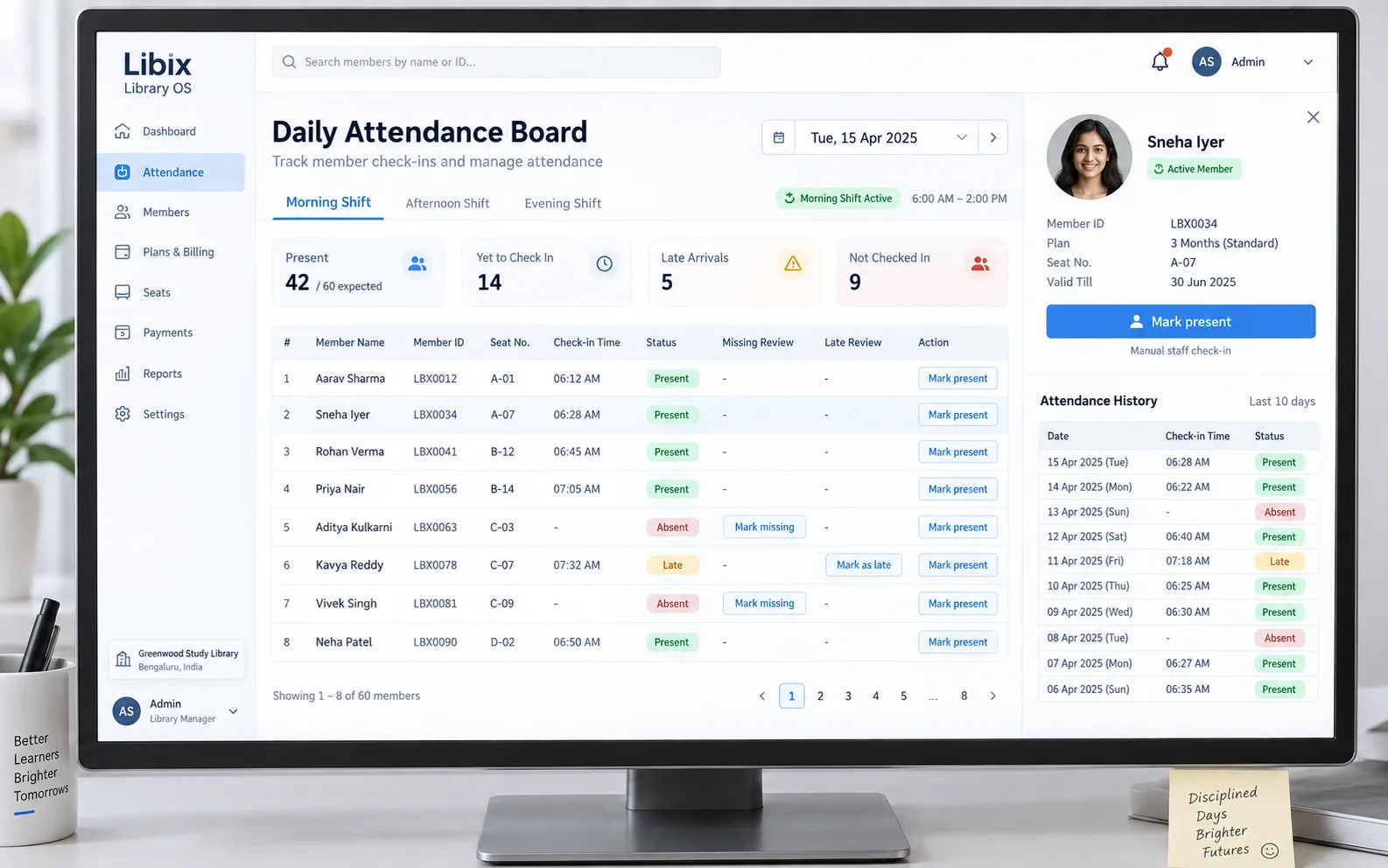
The morning check-in moment
A morning-shift member checks in, and staff review missed or unusual entries. The member-facing answer depends on the date, member, shift, seat context and the check-in record agreeing with what happened at the desk.
Focused interface view
The decisive view keeps the missing entry, member, seat, shift, date and recent history together. Staff can mark present, leave the entry unmarked or add a note according to the supported workflow.
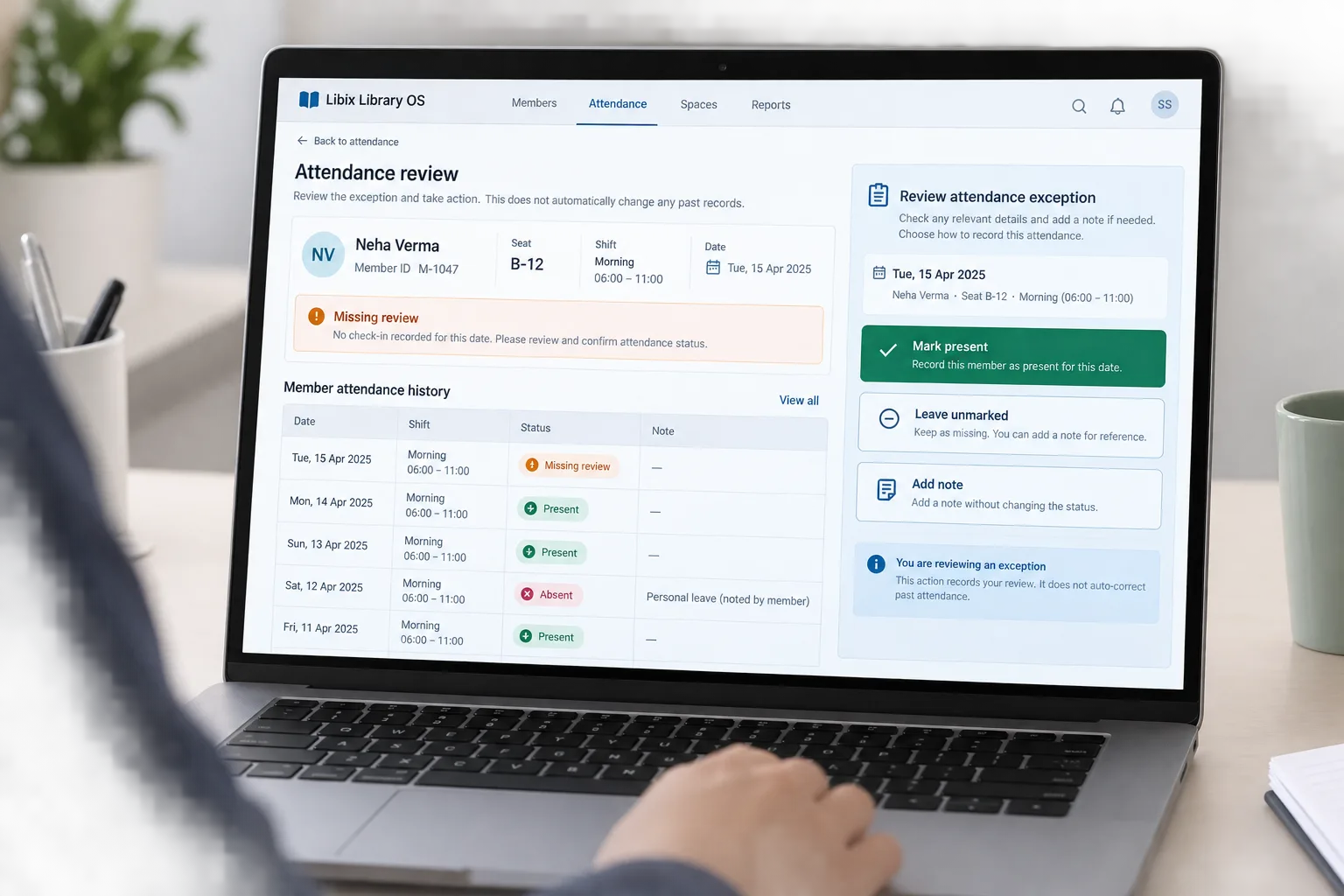
How the work fits together
Attendance is most useful when the method, member, shift, date and exception decision remain understandable to the next staff member or owner.
01
Select the date, member group or shift that defines the attendance question.
02
Use the supported staff check-in method and keep the member relationship visible.
03
Compare recent dates, shifts, statuses and notes before drawing a conclusion.
04
Leave unmarked, add a note or record the supported correction with staff judgment.
Capabilities by question
A good attendance view answers what was recorded, for whom, in which period and what needs human attention next.
Staff need a clear supported action that does not silently invent attendance from allocation.
Libix view: Use the current check-in view and confirm the member, date and shift before recording the visit.
A single day rarely answers a usage question without recent member and shift context.
Libix view: Review the history list with statuses, dates and notes that the current product supports.
Morning, evening and other time windows can change how a visit should be interpreted.
Libix view: Keep the selected shift connected to the member and attendance record.
Missing, late, absent or unusual entries require a human decision before the record is treated as complete.
Libix view: Open the exception context and choose the supported next action without rewriting unrelated history.

Product-in-use walkthrough
Use this walkthrough to discuss the attendance decisions your own reception process needs to support:
Check-in
Sneha Iyer arrives for the morning shift and staff confirm her member and time-window context.
History review
The attendance board shows the current entry beside recent history, including a previous unusual day.
Exception decision
If another expected entry is missing, staff review it and choose the supported action or leave a note.
Fit and decision criteria
Can staff describe the supported check-in action and its permissions without assuming another integration?
Can an owner review recent member attendance with the shift and note context needed for a fair question?
Can the team identify who reviews a missing or unusual entry and what action is recorded?
Connected Libix modules
Memberships describe access, seats describe the physical resource, shifts describe the time window and attendance describes the visit record. Fees and reports answer different questions. Review the broader study-library management solution, the shift-management page or return to the Solutions hub.
Questions for evaluation
The page workflow uses staff-recorded check-in as the supported baseline. Confirm the exact check-in methods, permissions and device behavior available in your current Libix setup; do not assume QR or biometric integration.
A member history view can help staff compare dates, shifts, statuses and notes. Ask the product team to demonstrate the current history view, correction behavior and access permissions.
No. Allocation identifies an intended or recorded seat relationship; attendance records actual presence. Keep the two records separate when reviewing usage or exceptions.
Review the member, date and shift context, then choose the supported action such as marking present, leaving it unmarked or adding a note. The staff decision should remain visible.
Shift context can make daily attendance easier to interpret when the library serves morning, evening or other time windows. Confirm the exact filters and reports supported in the current product.
Bring one normal check-in, one missing entry, one late or unusual entry and a member history question. Check whether staff can explain the record and the next action.
See the attendance workflow
Walk through the supported check-in method, daily board, member history, shift relationship and exception review with the people who track visits.
CodePex Technologies Private Limited · Verify current capabilities and terms with the product team.