Libix Logo· Library OS
  • FAQs
  • Features
  • Pricing
  • Solutions
  • About Us
  • Libix Learning
  • Libix Knowledge
  • Home→Solutions→Study Hall Management Software

    For paid study hall operators

    Study Hall Management Software for Real Daily Operations

    Schedule a shared hall across time slots while keeping zones, memberships, seat use and attendance visible. When the morning shift closes and an evening cohort arrives, Libix gives the team a clearer operating context for the next decision.

    See the complete solution
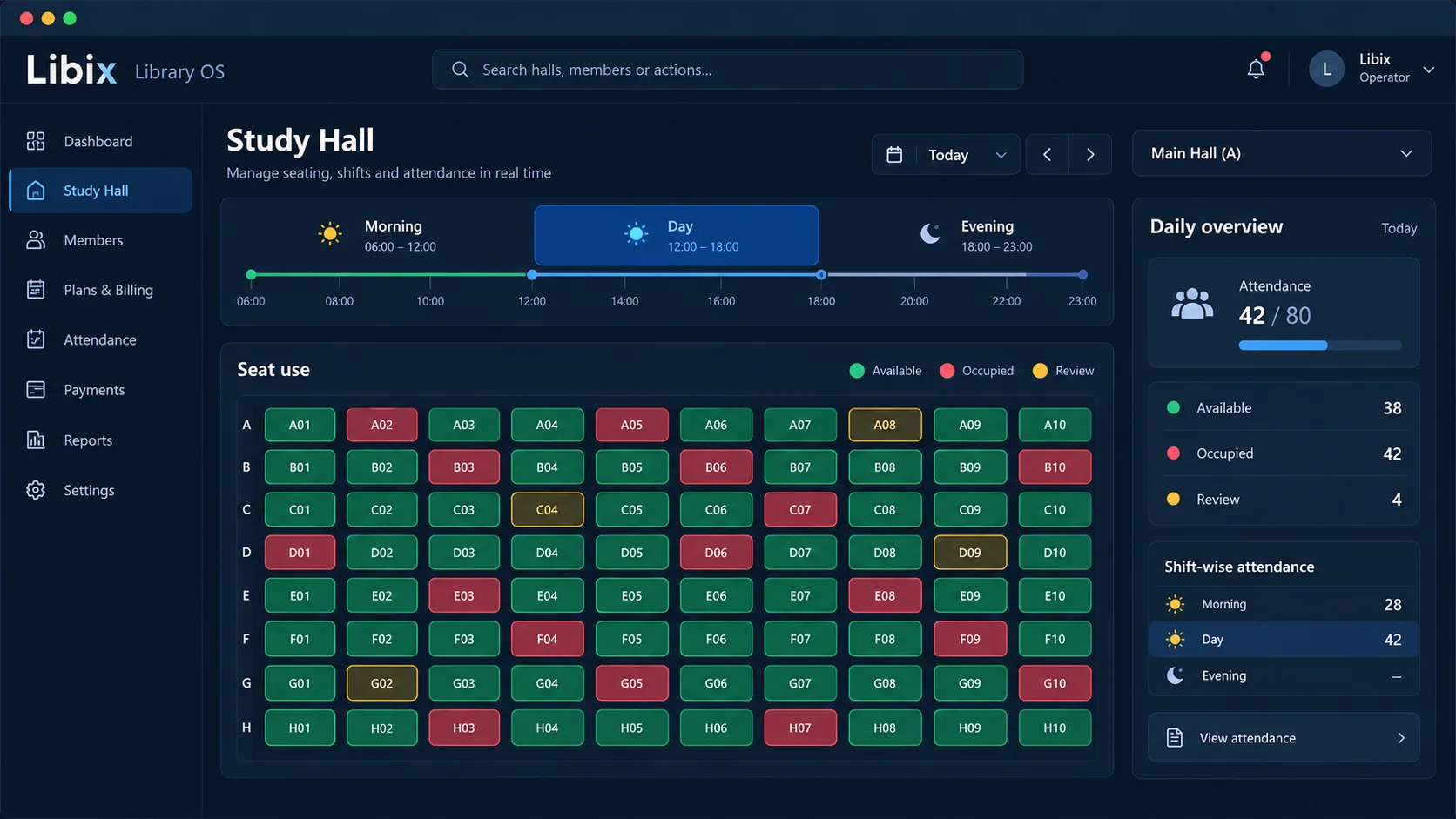
    Libix Library OS study hall dashboard showing a time-of-day shift timeline, seat use and daily overview

    A recognizable changeover

    The same hall fills a morning shift and reopens for an evening cohort.

    Staff need to understand what the earlier shift used, what the next shift can receive and which member or attendance records still need attention.

    A member-facing promise depends on the hall or zone, the shift, the membership, the seat record and the handover between staff. A clear operating view makes those relationships easier to check without claiming that the software makes the changeover decision automatically.

    How the work fits together

    Prepare the next shift from the current hall context.

    The workflow keeps physical space, time, member access and attendance distinct but connected. Staff confirm each stage before treating it as final.

    01

    Hall / zone

    Identify the shared operating space

    →

    02

    Shift

    Select the time window

    →

    03

    Membership

    Check the member’s access context

    →

    04

    Seat use

    Record the staff-confirmed allocation

    →

    05

    Attendance

    Review what happened in the period

    Capabilities by question

    Keep the shared hall understandable.

    A study hall needs a capacity conversation that respects both time windows and the people using them.

    ▦

    How is the shared hall organized?

    A hall or zone provides the physical context for the seats and time windows staff need to review.

    Libix view: Start with the supported hall, zone and seat structure rather than treating every seat as an isolated record.

    ◷

    Which shift is being scheduled?

    Morning, day and evening access may have different member and capacity implications.

    Libix view: Review the relevant time window and preserve the allocation context staff confirmed.

    ◉

    Which membership applies?

    The member’s plan and validity period should make sense alongside the chosen access window.

    Libix view: Check the membership record before treating a seat request as an approved allocation.

    ⌗

    What seat use should be visible?

    Operators need to distinguish available, occupied and review states without confusing allocation with attendance.

    Libix view: Use the supported seat and attendance views with explicit definitions for each question.

    ✓

    What happened during the shift?

    Attendance adds evidence about the operating period, but one event does not define occupancy or business performance.

    Libix view: Review attendance in its proper period and member context.

    Product-in-use walkthrough

    One hall, two cohorts, one staff handover.

    Use this fictional example to test the changeover with your own hall rules.

    11:45 · Morning close

    Staff review the current shift, attendance context and any seat or member issue that needs a handover.

    12:00 · Hall reset

    The next shift is treated as a new time window; staff check availability and the membership context before allocating.

    18:00 · Evening review

    The operator checks the evening attendance and leaves any collection or exception follow-up visible for the next review.

    Fit and decision criteria

    Test the rhythm of your hall, not just the feature list.

    Changeover rules

    Can staff explain what happens between one cohort and the next without losing the operating record?

    Shift visibility

    Can the team see the relevant time window, members, seats and attendance for the question being asked?

    Shared ownership

    Can reception, staff and the owner understand who must confirm the next allocation or follow-up?

    Connected Libix modules

    Shared space works best with connected context.

    Hall and zone structure establish the space. Shifts establish the period. Memberships establish access. Seat use and attendance provide operating evidence. Review the broader study-library management solution or return to the Solutions hub.

    Questions for evaluation

    Ask about the next shift, not only the current one.

    How can I manage several shifts in one hall?+

    Start by defining the hall or zone and the time windows your operation actually uses. Then review memberships, seat use and staff-confirmed allocations in the relevant shift context. Confirm the current setup during a demo.

    Can I track usage by shift?+

    Shift context can be reviewed alongside attendance and seat records where supported. Ask the product team to demonstrate the exact report or view for your hall and define what “usage” means before comparing periods.

    Can the same hall reopen for an evening cohort?+

    A shared hall can be evaluated through separate access windows and seat allocations. The operator still needs to confirm the changeover rules, availability and member records before recording the next cohort.

    Can study-hall staff manage memberships and attendance together?+

    The connected workflow is intended to keep membership, seat, shift and attendance context close together. Verify user access and the exact staff actions for your current product version.

    Does Libix manage classroom teaching or book circulation?+

    No. This solution is for paid study-space operations. It does not claim course delivery, classroom scheduling, cataloguing or book lending.

    What should I test in a study-hall demo?+

    Bring one morning allocation, one evening changeover, one membership case and one attendance question. Check whether the records help staff make and explain the next decision.

    See the changeover workflow

    Bring your morning and evening hall routines to a Libix demo.

    Walk through zones, shifts, memberships, seat use and attendance with the people who manage the handover.

    Review pricing

    CodePex Technologies Private Limited · Verify current capabilities and terms with the product team.

    Libix is the simplest library management software for modern libraries in India. Built to help library owners focus on their members instead of spreadsheets.

    CIN : U93000UP2017PTC091269
    URN : UDYAM-UP-50-0143487
    Privacy Policy·Terms & Conditions·Refund Policy·Trial Policy·Disclaimer·

    Libix is a proud product of CodePex Technologies Private Limited.
    © 2026 Libix · All rights reserved.