
Which branch owns the record?
Local seats, members, dues and staff decisions need branch identity before a comparison is meaningful.
Evaluation view: Keep organization and branch context visible and verify how current records are scoped.
For owners running several locations
Oversee branches without losing the local seat, member, dues or staff context that makes a daily decision understandable. Libix helps frame organization-level visibility and branch-level work while leaving cross-branch permissions, transfers and plan behavior to the supported configuration.
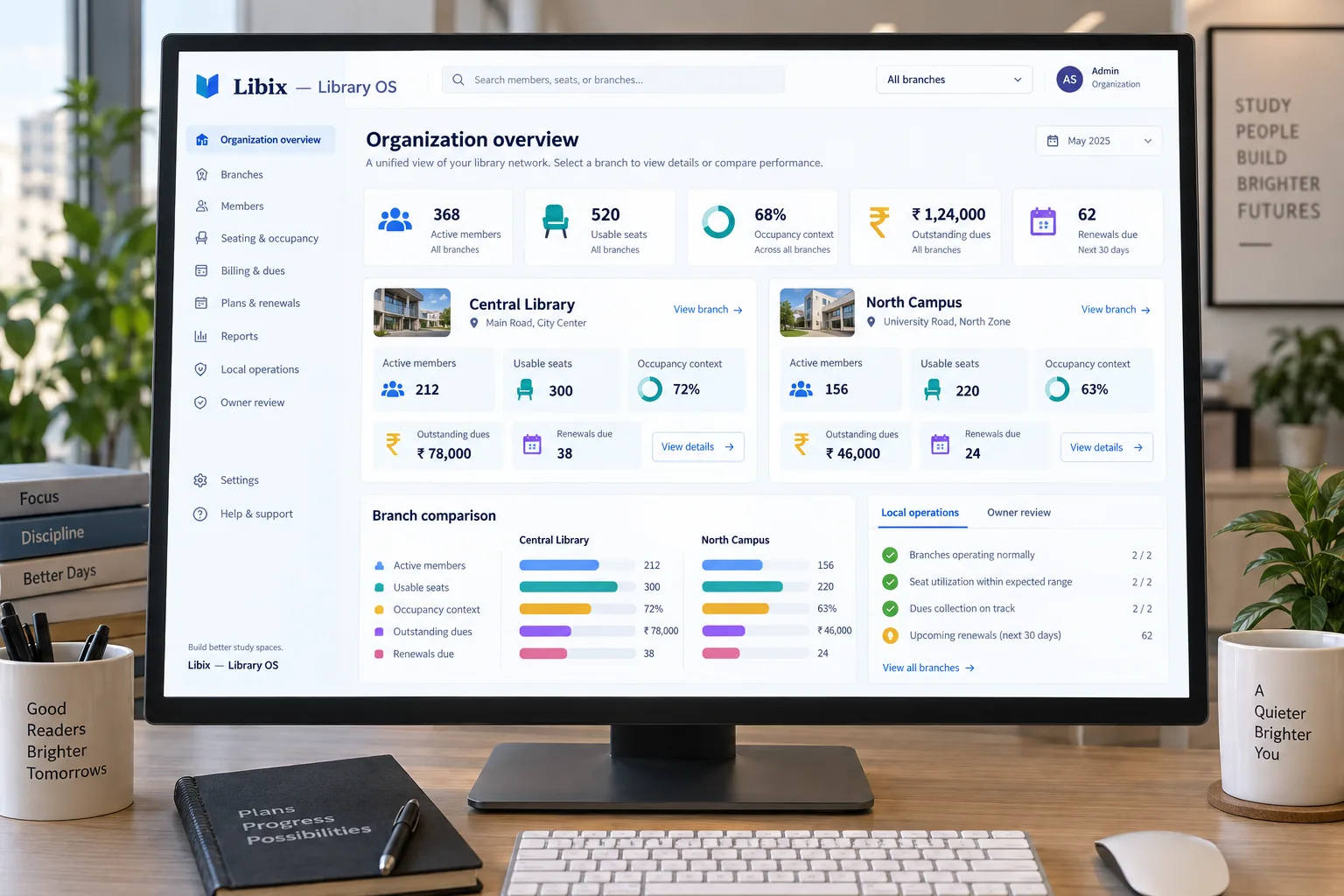
The two-branch owner question
A two-branch owner reviews one location’s occupancy and another’s dues. Staff need to answer the local member or seat question at the right branch, while the owner needs an organization-level view that can be traced back to each location.
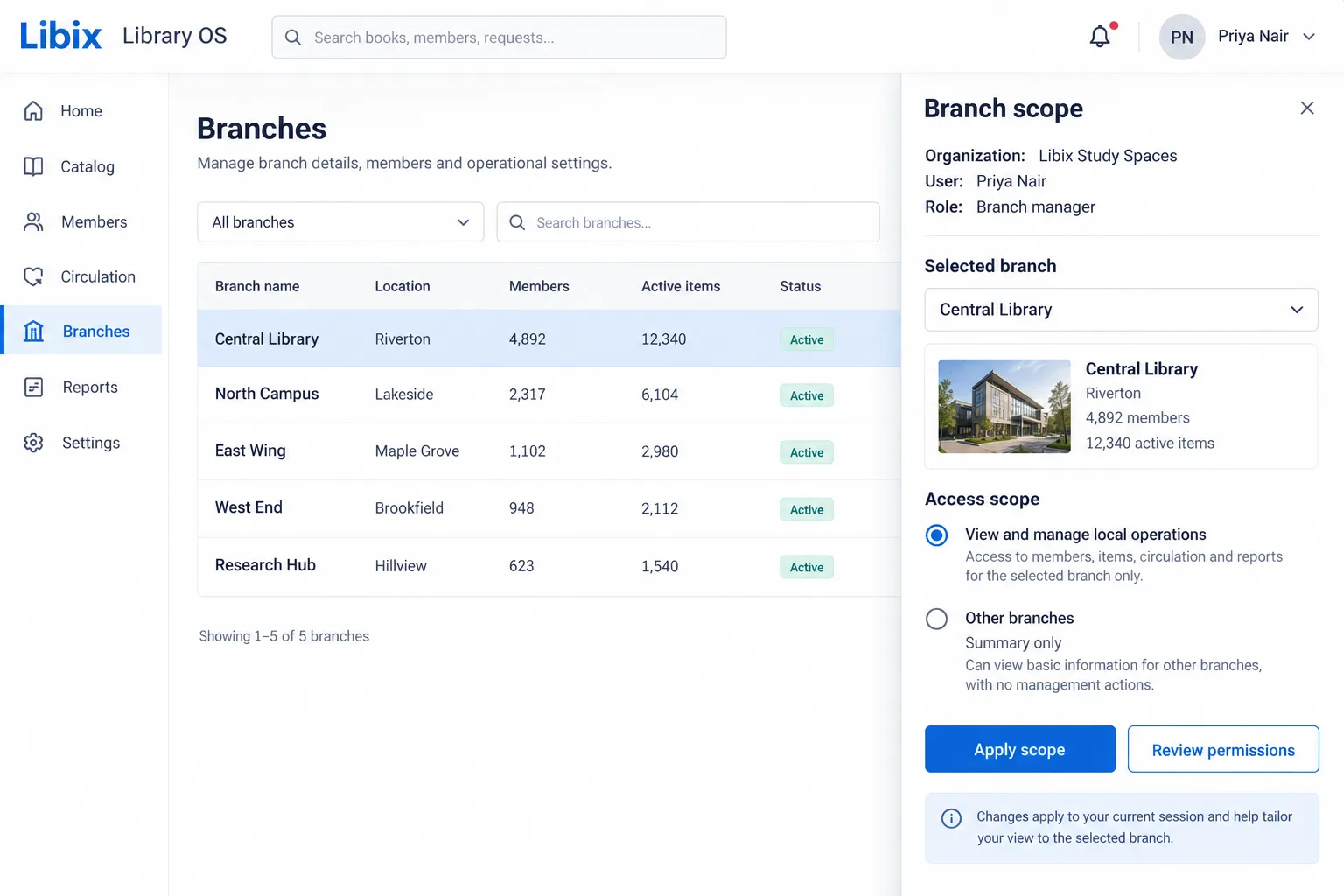
Focused scope review
The decisive view puts organization, user, role, selected branch and access scope together. It helps an owner ask whether the current user should manage local operations, see a summary or receive another defined permission.
How the work fits together
A branch-aware workflow should identify where a record belongs, who can access it, what the owner can compare and where the next local decision is taken.
01
Identify the organization and the branches that belong to the owner’s operating picture.
02
Keep branch, member, seat, shift, dues and staff records tied to the location where work occurs.
03
Review what each role can see or change, and whether the scope is local, summary-only or organization-wide.
04
Use aggregate visibility for the owner question, then return to the right branch before taking local action.
Capabilities by question
The page focuses on scope and visibility. Verify current organization, branch, permission, filter, report, transfer and local-operation behavior before presenting a feature as live.
Local seats, members, dues and staff decisions need branch identity before a comparison is meaningful.
Evaluation view: Keep organization and branch context visible and verify how current records are scoped.
An owner, branch manager and reception user may need different responsibilities and visibility.
Evaluation view: Review role, permission and scope behavior in the supported access model before assigning work.
A branch filter should narrow the question without silently mixing locations.
Evaluation view: Select the supported branch context and inspect whether local members, seats, dues and reports follow it.
Aggregate visibility helps identify a question, but local records explain the next action.
Evaluation view: Compare supported summaries, then drill into the selected branch and source records.
A multi-branch view should not erase reception routines, staff handovers or branch-specific policies.
Evaluation view: Evaluate admissions, memberships, seats, shifts, attendance, fees and staff work in their local context.

Product-in-use walkthrough
Use this sequence to evaluate the branch decisions your own organization needs to support:
Central Library
The owner reviews occupancy while the branch team retains its local seat and member context.
North Campus
A separate dues question stays attached to its branch, member, payment and follow-up records.
Owner review
The comparison surfaces the next question; staff return to the appropriate branch before changing a local record.
Fit and decision criteria
Can the team state whether a member, seat, payment, staff record or report belongs to one branch or the organization?
Can an owner distinguish local management, summary visibility and organization-level administration?
Can each branch keep its own daily routines and history while the owner compares the right summaries?
Connected Libix modules
Memberships, seats, shifts, attendance, fees, staff and reports can answer different questions at organization and branch level. Review the study-library management solution, the reporting and analytics page or return to the Solutions hub.
Questions for evaluation
Separate branch context is the right question when local seats, members, dues and staff work must remain understandable. Confirm the current branch filters, scope behavior and supported local views in Libix rather than assuming every screen is branch-aware.
Branch-limited staff access depends on the configured role, permission and scope model. Ask the product team to demonstrate what a branch manager can view, change and report, and how former or transferred staff access is handled.
Aggregate visibility is useful for owner review, but it should preserve the ability to drill back into each branch. Confirm which summaries, reports and filters support organization-level comparison.
Do not assume cross-branch seat transfers or membership portability. A transfer may be a new branch-scoped event with its own policy, history and permission requirements; verify the supported workflow before promising it.
Current trial and policy content states that branches require separate subscriptions after the organization’s complimentary trial is used. Confirm current commercial terms, organization setup and any plan-specific branch behavior with Libix.
Bring one local seat question, one branch-specific dues case, one owner comparison question and one staff-permission case. Ask the team to show both the local record and the organization-level view.
See the branch workflow
Walk through branch scope, permissions, local operations, comparative visibility, member context and the supported commercial setup for multiple locations.
CodePex Technologies Private Limited - Verify current capabilities and terms with the product team.