
Who is on the team?
Owners need staff identity and role context before assigning responsibility or reviewing compensation.
Evaluation view: Use the supported staff directory and verify fields, status, branch scope and permissions.
For owners managing reception staff and salary work
Keep staff records, attendance, leave and compensation review close enough to explain the month-end decision. Libix helps you frame the records and approvals that need to agree, while the owner retains responsibility for the final payroll decision and payment process.
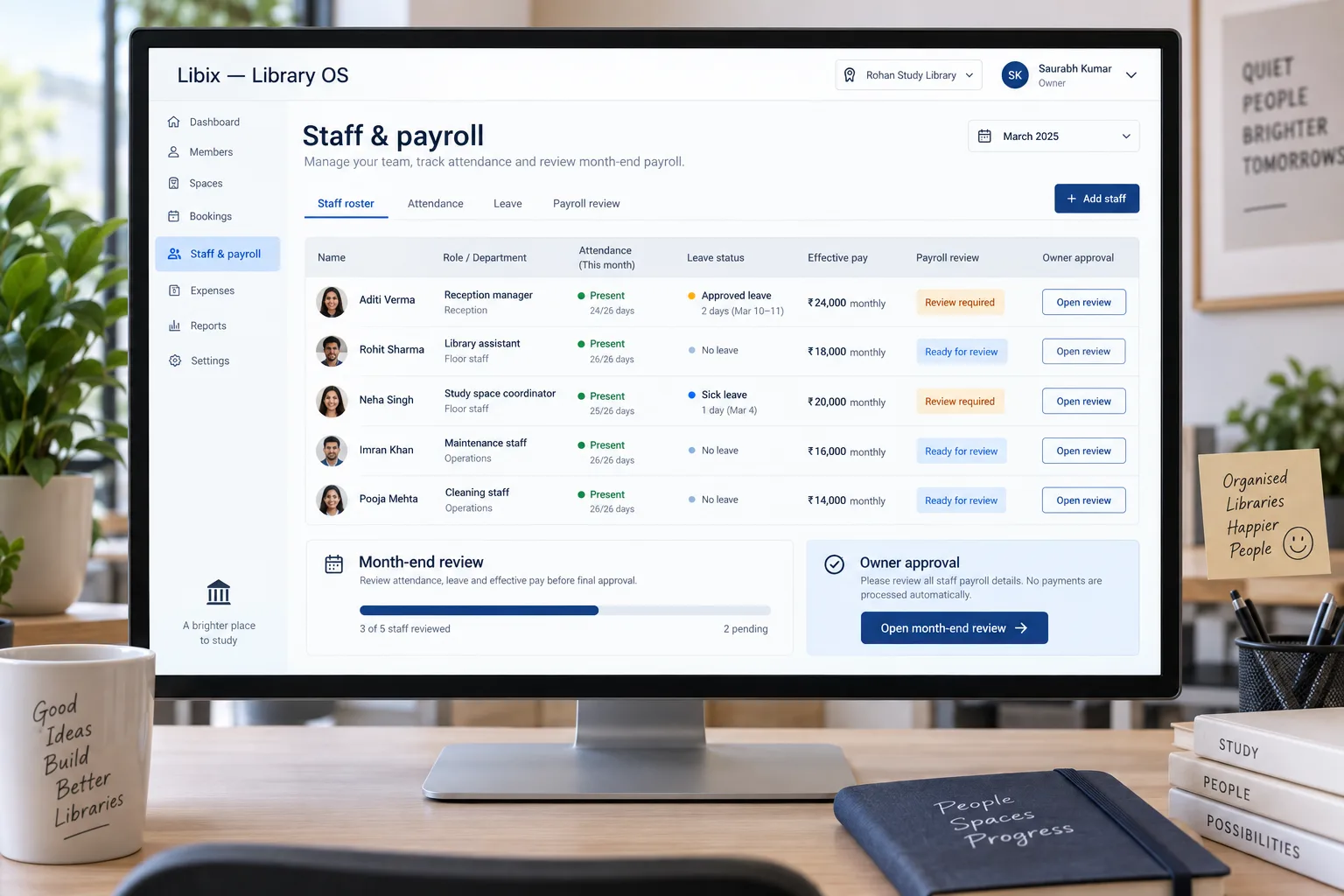
The month-end operating situation
At month-end, the owner reviews the staff roster, attendance, approved leave and any compensation adjustment before deciding what is ready for the next payroll step. The member-facing consequence is practical: reception coverage, service continuity and staff questions should not depend on a salary figure that nobody can explain.
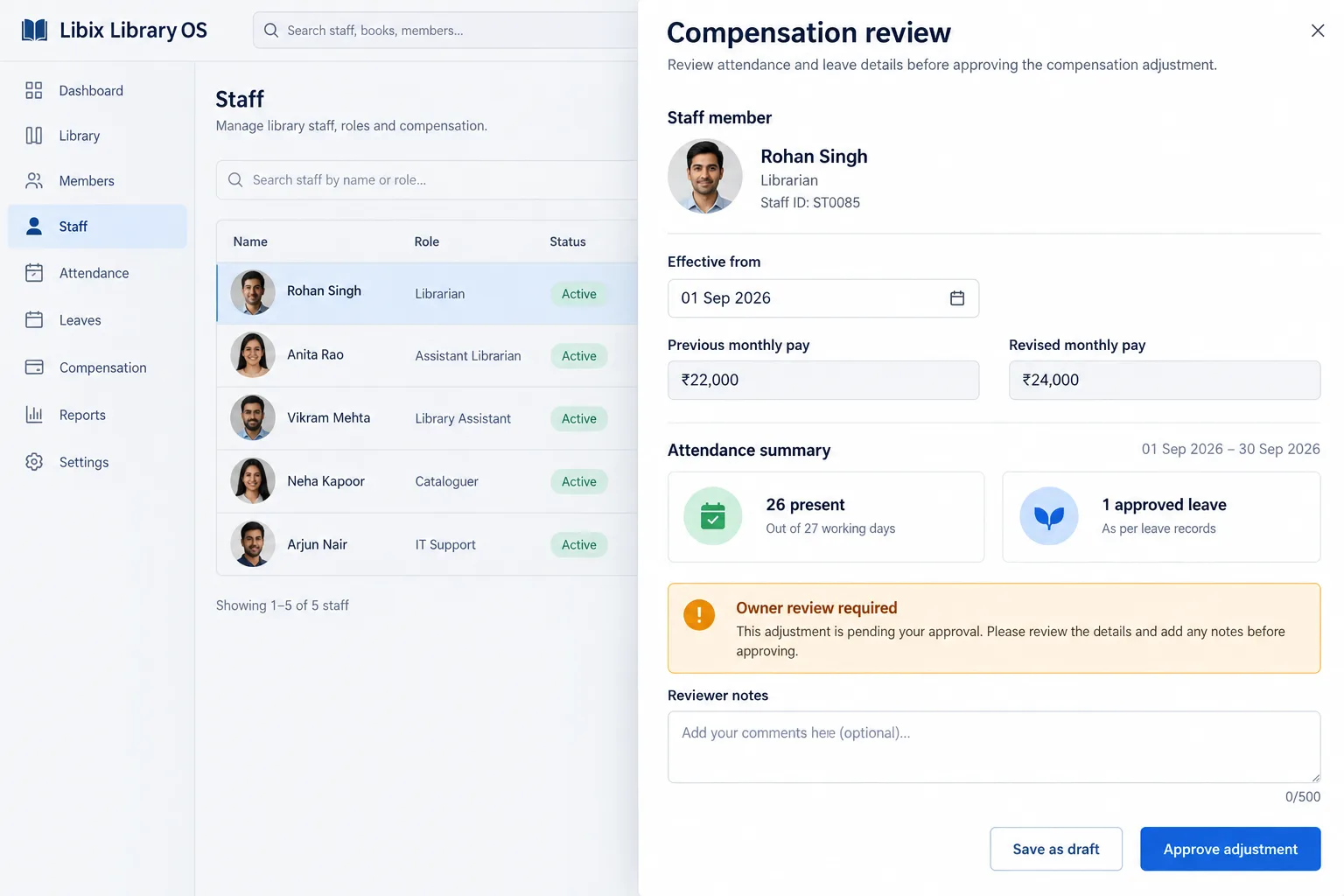
Focused compensation review
The decisive view brings the staff member, effective date, previous and revised pay, attendance summary and reviewer notes together. It should make the owner’s decision visible, not hide it behind an automatic payroll promise.
How the work fits together
A staff-and-payroll workflow is useful when the owner can trace the outcome to people, dates, attendance, leave, compensation terms and an explicit approval state.
01
Confirm the person, role, status and operating context before reviewing the period.
02
Separate present, approved leave, missing and corrected entries that affect the discussion.
03
Compare the period, current terms and any dated adjustment that needs owner attention.
04
Save a draft, approve or hand off the supported next step; do not assume payment is automatic.
Capabilities by question
The repository contains staff, attendance and payroll-related operating scope, but does not establish a released automatic payroll-payment capability. Confirm exact screens, permissions and calculations in the current product.
Owners need staff identity and role context before assigning responsibility or reviewing compensation.
Evaluation view: Use the supported staff directory and verify fields, status, branch scope and permissions.
Attendance and leave should not be collapsed into one unexplained number.
Evaluation view: Review the available attendance, leave and correction records before making a decision.
A change may begin on a particular date and should not rewrite an earlier period.
Evaluation view: Check current and revised compensation with effective-date and approval context where supported.
A month-end result requires owner review and a clear status before any payment handoff.
Evaluation view: Verify draft, review, approval and payment behavior in the current product rather than assuming it is released.

Product-in-use walkthrough
Use this sequence to evaluate the staff decisions your own study-library operation needs to support:
Open the roster
The owner confirms Aditi Verma’s reception role and the period under review.
Check the source records
Attendance shows present days and approved leave; any correction or adjustment is reviewed rather than silently assumed.
Decide the next step
A dated compensation change is saved for review, approved by the owner or handed off according to the supported workflow.
Fit and decision criteria
Can the owner trace a payroll discussion to staff, attendance, leave and dated compensation records?
Is it clear who can edit, save as draft, approve, reject or hand off a payroll decision?
Can the team distinguish a current period, an earlier adjustment and a future effective date?
Connected Libix modules
Staff and payroll questions connect to attendance, leave, memberships, seats, shifts, fees and reporting, but they should not be collapsed into one metric. Review the broader study-library management solution, the attendance page or return to the Solutions hub.
Questions for evaluation
Attendance can provide context for a compensation review, but the relationship depends on the configured staff, leave and payroll workflow. Confirm the current calculation, adjustment and approval behavior instead of assuming attendance automatically determines pay.
Owner review should remain an explicit decision before any payment action. The repository does not establish a released automatic payroll-payment workflow, so confirm what current Libix screens support for draft, review, approval and payment handoff.
A staff directory is useful when role, status, branch or responsibility context is visible to the owner. Confirm the fields, permissions and history available in the current setup.
Approved leave should remain distinguishable from an absent or unrecorded day. Review the underlying attendance and leave records before making an adjustment or compensation decision.
An effective date is important when a pay change applies from a specific period. Ask the product team to demonstrate whether the current workflow preserves previous and revised values with the date and approval context.
Bring one staff record, one approved leave case, one attendance adjustment and one month-end compensation review. Ask who can edit, approve, save as draft and explain the final decision.
See the staff review workflow
Walk through staff records, attendance, approved leave, effective dates, owner review and the supported payroll handoff with the people responsible for month-end decisions.
CodePex Technologies Private Limited - Verify current capabilities and terms with the product team.