Libix Logo· Library OS
  • FAQs
  • Features
  • Pricing
  • Solutions
  • About Us
  • Libix Learning
  • Libix Knowledge
  • Home->Solutions->Library Reporting and Analytics Software

    For owners seeking operational measures

    Library Reporting and Analytics Software for Real Daily Operations

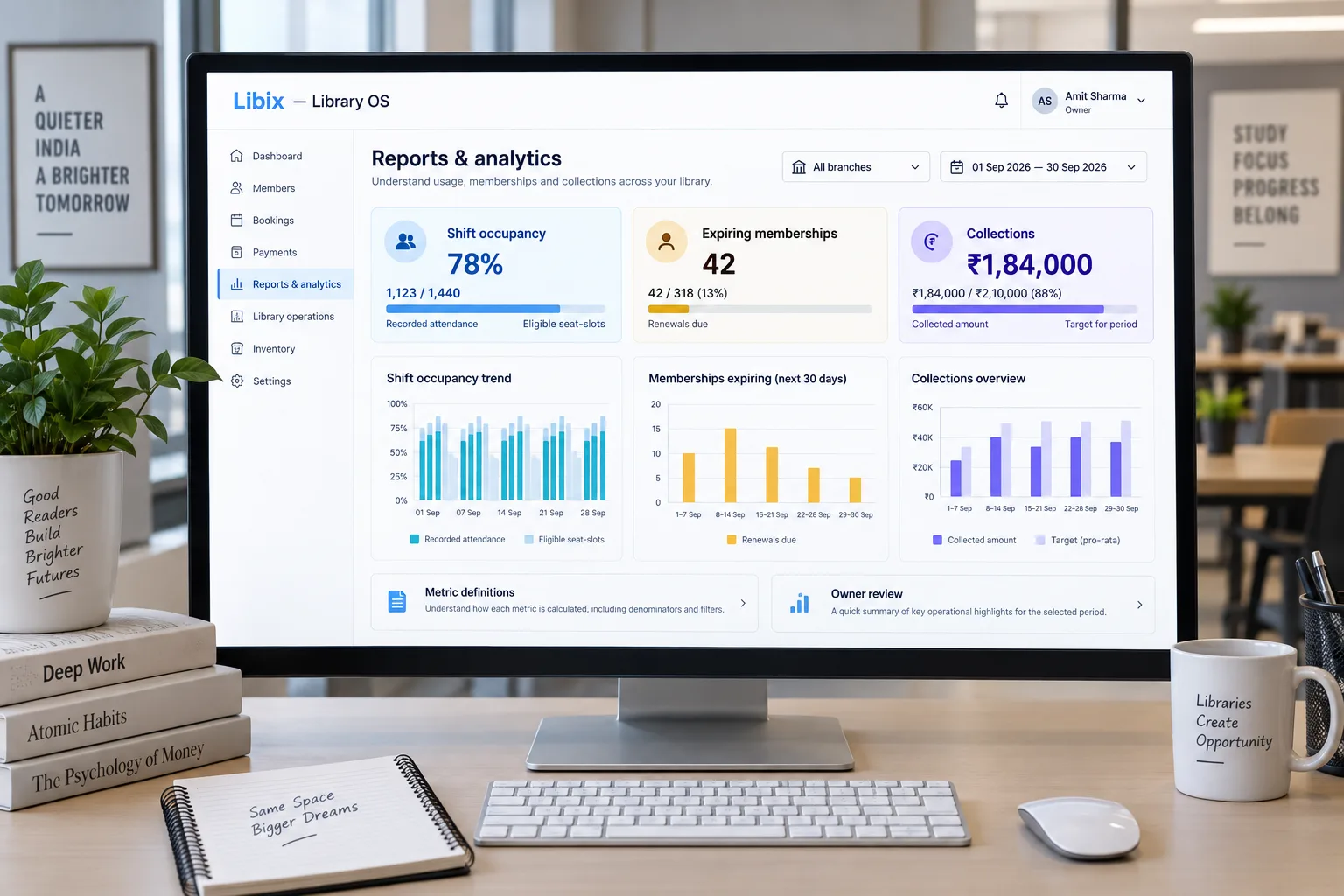
    Compare shift occupancy, expiring memberships and collections over a selected period—but start with definitions. Libix helps connect the records behind an owner question while keeping the numerator, denominator, date basis and source context visible for review.

    See the complete solution
    Libix Library OS reporting dashboard with shift occupancy, expiring memberships and collections

    The owner’s reporting question

    A number is only useful when the operation knows what it measures.

    The owner compares shift occupancy, expiring memberships and collections over a selected period. Staff may need to follow up with an expiring member, check an unusual attendance pattern or explain a collection total. The records, definitions and selected period must agree before the next decision is made.

    The reporting discipline: define the measure first, then use the result to ask what needs human attention.

    Focused definition review

    Show the denominator before interpreting occupancy.

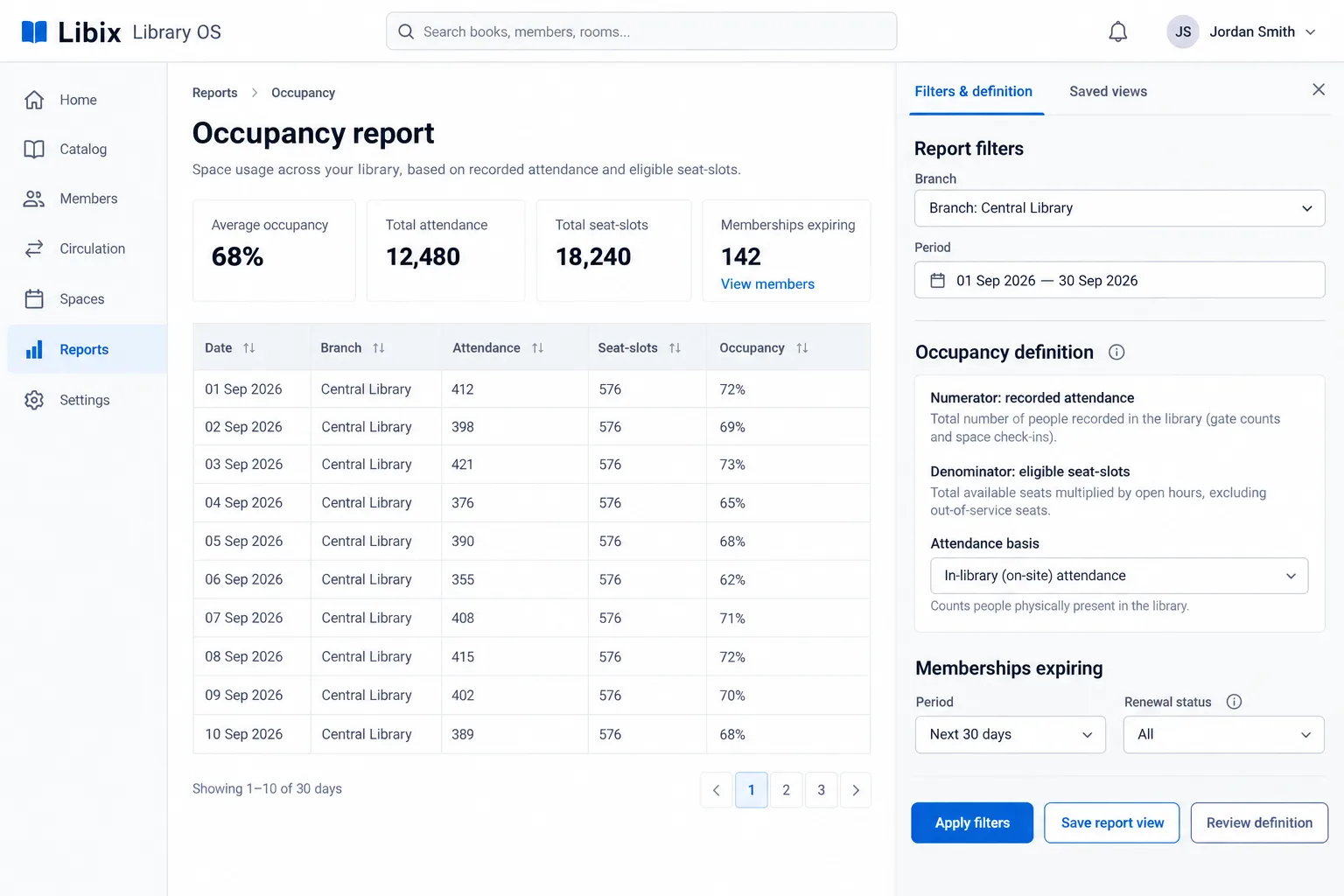
    The focused view places branch, period, attendance basis, numerator and denominator beside the result. This makes it easier to distinguish recorded presence from allocation, membership entitlement or physical capacity.

    Libix Library OS occupancy report with branch and period filters and metric definitions

    How the work fits together

    Turn a dashboard question into reviewable evidence.

    Reporting should connect a decision, a definition, a selected context and the source records needed to explain what changed.

    01

    Name the question

    Start with a decision such as capacity review, renewal follow-up or collection review.

    ->

    02

    Define the metric

    State the numerator, denominator, period, source population and exclusions before reading a number.

    ->

    03

    Apply the context

    Filter by the supported date, branch, shift, plan or status scope that matches the question.

    ->

    04

    Review the evidence

    Use the result to decide what needs attention, then inspect source records before acting.

    Capabilities by question

    Ask what the report needs to explain.

    The page focuses on metric definitions and operational decisions. Verify current reports, filters, scopes, saved views, exports and source drill-down behavior in the product.

    01

    Which reports exist?

    Owners need to know whether a report answers a real operational question rather than merely displaying a chart.

    Evaluation view: Review supported report names, source records, definitions and available permissions in the current product.

    02

    What period is included?

    A metric without a clear time range can mix current work with historical context.

    Evaluation view: Apply the supported date filter and document the period basis before comparing results.

    03

    What does occupancy mean?

    Attendance, allocation, membership and usable capacity are different populations.

    Evaluation view: Show the numerator, denominator, attendance basis and exclusions beside the result.

    04

    What is expiring?

    Renewal follow-up depends on which active memberships, dates and statuses are included.

    Evaluation view: Review the selected expiry window and open the relevant membership context before contacting a member.

    05

    What was collected?

    Collections need payment, receipt, period and account context before an owner interprets the amount.

    Evaluation view: Link the summary to supported source records and keep revenue, collection and profit distinct.

    Indian study-library owner and staff discussing an operational report

    Product-in-use walkthrough

    One period, three questions, one accountable review.

    Use this sequence to evaluate the reporting questions your own study-library operation needs to support:

    Capacity

    The owner checks shift occupancy with a stated attendance numerator and eligible seat-slot denominator.

    Renewals

    Staff open memberships expiring in the selected window and identify the next follow-up without treating expiry as renewal intent.

    Collections

    The owner reviews payment totals with period, account and source-record context before interpreting the number.

    Fit and decision criteria

    Check the reporting questions your owner actually asks.

    Definition clarity

    Can staff state the numerator, denominator, period and exclusions for the metric being discussed?

    Source traceability

    Can the owner open the member, membership, attendance, allocation, payment or renewal context behind a result?

    Action ownership

    Does a report lead to a named review or next step without pretending that correlation proves a cause?

    Connected Libix modules

    Reports are useful because daily records give them meaning.

    Memberships and renewals provide lifecycle context, seats and shifts provide capacity context, attendance provides recorded presence and fees provide collection context. Review the study-library management solution, the attendance page or return to the Solutions hub.

    Questions for evaluation

    Ask what the metric needs to explain.

    How is occupancy calculated?+

    Occupancy depends on the chosen definition. A useful view states its numerator, denominator, period and attendance or allocation basis; for example, recorded attendance divided by eligible seat-slots is different from allocated seats divided by usable seats. Confirm the current Libix report definition before comparing results.

    Can reports be filtered by date or branch?+

    Date and branch filters are important questions for any multi-period or multi-location report. Confirm which filters, scopes, saved views and report exports are available in the current Libix setup rather than assuming every report supports both.

    Can I compare renewals and collections in one view?+

    They answer related but different questions. Renewals describe membership continuity, while collections describe money received. A useful report should preserve each definition, period and source population.

    Can a dashboard predict future occupancy?+

    Do not assume prediction from historical charts. Reports can summarize recorded operational data; future demand, attendance and renewal outcomes require separate assumptions and human interpretation.

    Are reports the same as source records?+

    No. A report is a filtered or summarized view of source records. Review the underlying member, membership, allocation, attendance, payment and renewal context before using a metric for a consequential decision.

    What should I bring to a reporting demo?+

    Bring one occupancy question, one upcoming-renewal question and one collection question. Define the numerator, denominator, period, branch and source records you expect staff and owners to see.

    See the reporting workflow

    Bring one capacity, renewal and collection question to a Libix demo.

    Walk through definitions, periods, branch context, source records and owner review with the people who turn daily study-library activity into operating decisions.

    Review pricing

    CodePex Technologies Private Limited - Verify current capabilities and terms with the product team.

    Libix is the simplest library management software for modern libraries in India. Built to help library owners focus on their members instead of spreadsheets.

    CIN : U93000UP2017PTC091269
    URN : UDYAM-UP-50-0143487
    Privacy Policy·Terms & Conditions·Refund Policy·Trial Policy·Disclaimer·

    Libix is a proud product of CodePex Technologies Private Limited.
    © 2026 Libix · All rights reserved.