
When does the term end?
Staff need a visible expiry date before asking a member to decide about the next period.
Evaluation view: Review the current membership, effective dates and expiry context in the member record.
For membership continuity
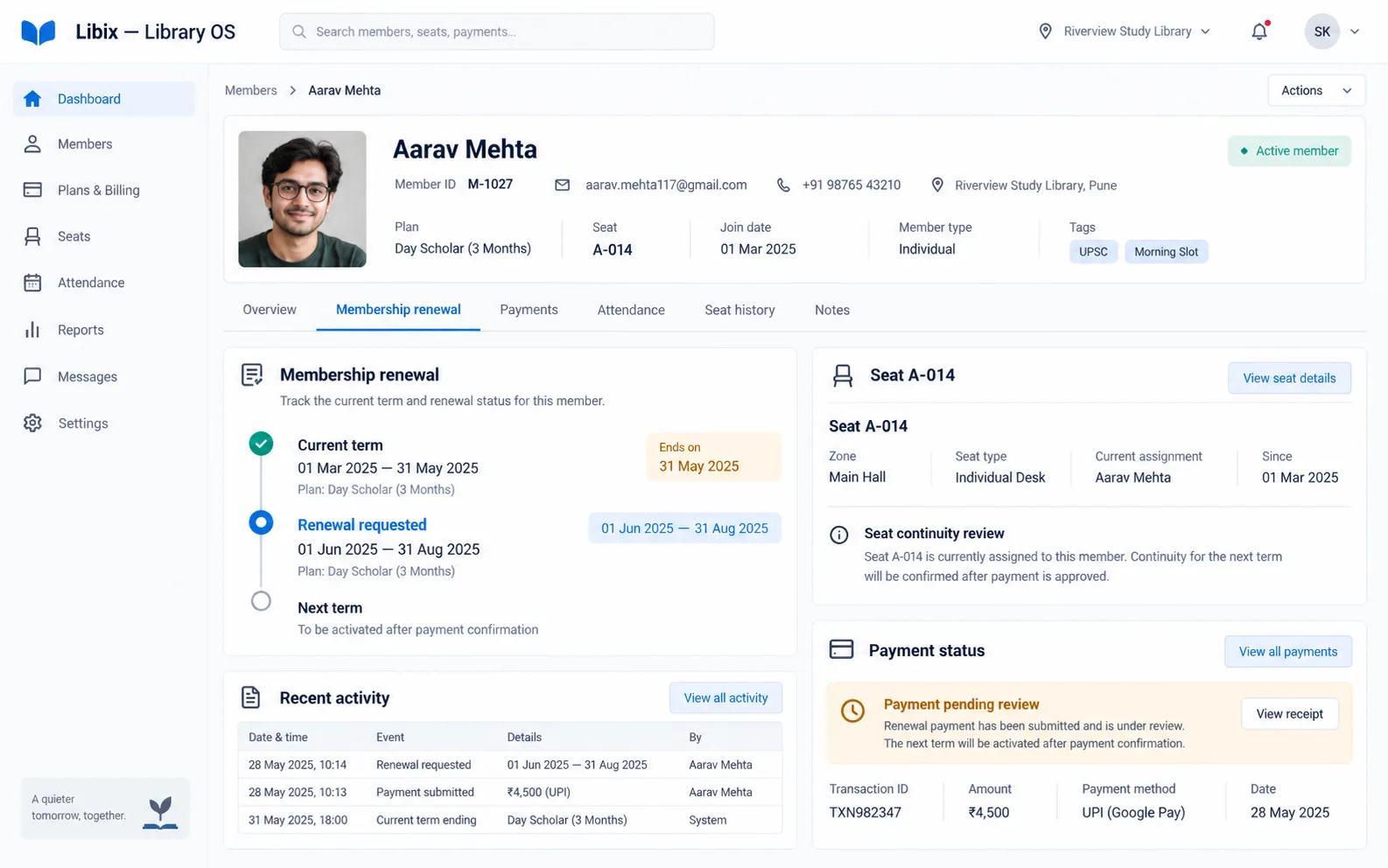
A member renews before expiry and wants to keep the same seat if available. Libix gives staff a connected place to review the current term, renewal event, new dates, payment context and seat-continuity question before the next decision.
The renewal moment
The receptionist checks the current term, records the renewal request, reviews the new dates and confirms the member-facing consequence. Payment status and seat availability still need their own review; one event should not be mistaken for all the others.
Focused renewal review
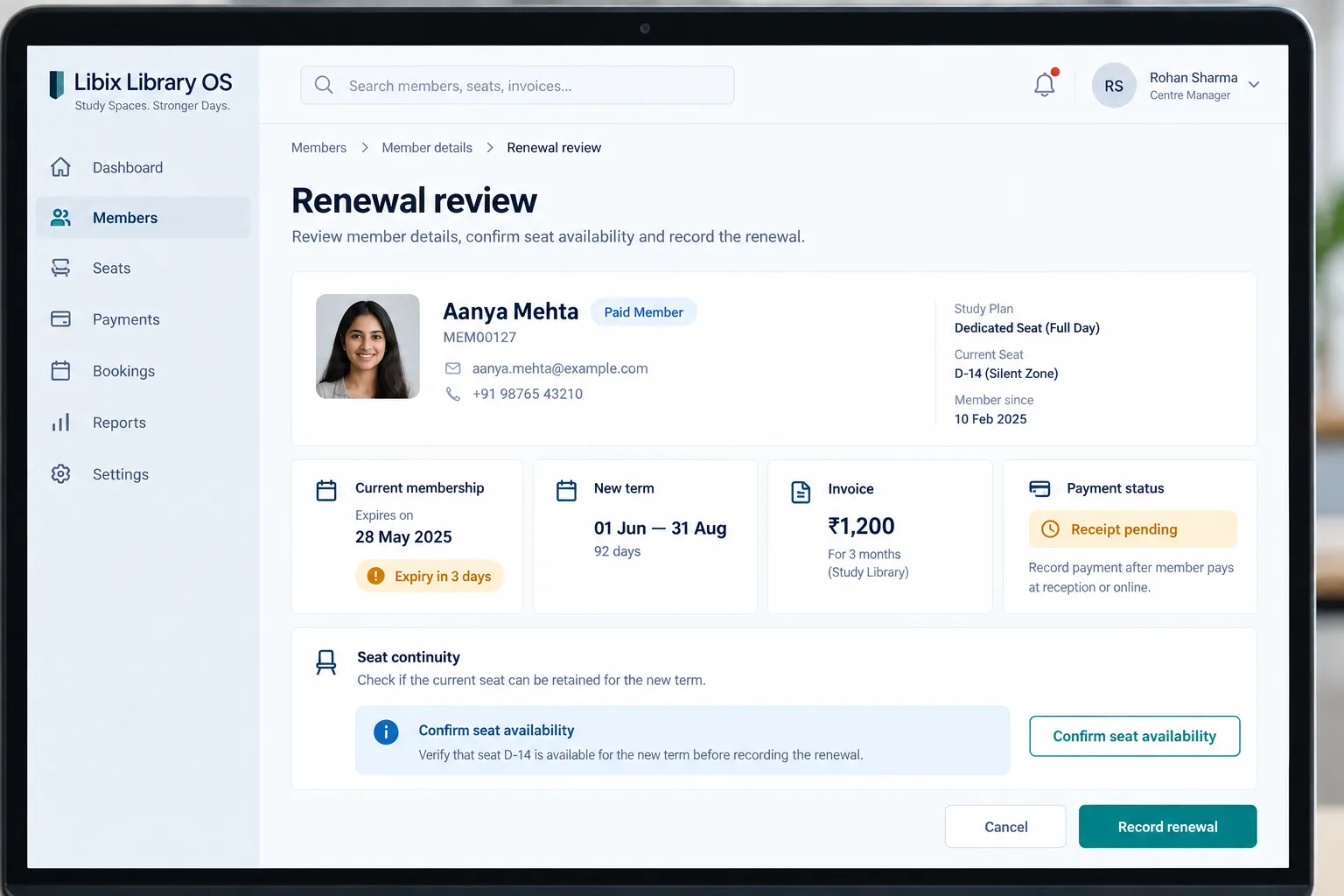
The decisive view helps staff distinguish an expiring current term, a requested new term, a payment or receipt state and a seat that still needs availability confirmation.
How the work fits together
The workflow keeps the renewal event, new period, payment record and physical seat as related but distinct staff decisions.
01
Open the member and current term so staff know what is ending and when.
02
Capture the member’s request or renewal event without assuming payment or activation is complete.
03
Review the new effective and expiry dates before explaining the next access period.
04
Check the invoice/payment state and seat availability before closing the staff decision.
Capabilities by question
Staff need a visible expiry date before asking a member to decide about the next period.
Evaluation view: Review the current membership, effective dates and expiry context in the member record.
A request, payment and activated term can be different moments in the lifecycle.
Evaluation view: Record the supported renewal state and keep the next staff action explicit.
A renewal is easier to explain when the new start and expiry dates are visible.
Evaluation view: Check the configured period before communicating access continuity to the member.
The amount, invoice, receipt and payment status answer a different question from membership validity.
Evaluation view: Review the fee or document relationship and confirm what remains pending.
A member may want the same seat, but availability still needs a staff decision.
Evaluation view: Check the seat allocation and confirm availability before treating continuity as complete.

Product-in-use walkthrough
Use this fictional scenario to discuss the staff decisions your own process needs to support:
Current term
Aarav Mehta’s current study membership ends on 31 May 2025 and staff can see the expiry context.
Renewal request
Aarav asks to continue from 01 June through 31 August; staff review the new term before recording it.
Seat and payment
The ₹1,200 invoice or payment state is checked, while seat A-014 is confirmed separately rather than assumed to be preserved.
Fit and decision criteria
Can staff identify members who need a renewal conversation without reconstructing dates?
Can the team separate renewal, payment, receipt, activation and seat availability questions?
Can the owner confirm what happens to a member’s seat or shift instead of promising continuity automatically?
Connected Libix modules
Memberships explain the term, seats and shifts explain continuity, fees explain the obligation, attendance gives actual-use context and reports help owners review follow-up. See the study-library management solution, membership management, fee management or return to the Solutions hub.
Questions for evaluation
A member can request or discuss renewal before the current term expires. Staff should review the existing term, new term, payment state and configured renewal workflow before recording the event.
Not automatically from this page. Seat continuity depends on availability and the supported allocation workflow, so staff should confirm the seat before treating it as retained for the new term.
The member, current plan, expiry date and next action should be visible together. Confirm the exact expiry filters or reminders available in your current Libix setup.
The effective dates and payment or receipt state should be reviewed before the next term is treated as active. Confirm the current product behavior during a demo.
Fees, invoices and receipts are related records but should not be assumed to complete one another automatically. Review the supported payment and document workflow for your setup.
No. This page focuses on the renewal event and continuity question. The broader membership-management workflow covers plan lifecycle, validity and status.
See the renewal workflow
Walk through expiry visibility, a renewal event, the new term, payment status and the seat-continuity question your staff needs to answer.
CodePex Technologies Private Limited - Verify current capabilities and terms with the product team.