
Where is the seat?
Large facilities become easier to navigate when staff can identify the area and current seat state.
Evaluation view: Use the supported seat-map, zone or floor context, then inspect the selected seat before acting.
For complex daily operations
Keep zones, seats, shifts and staff decisions understandable when a facility gets busy. Libix gives your team a connected place to inspect the current operational context, while your configured roles and supported workflows determine what each person can change.
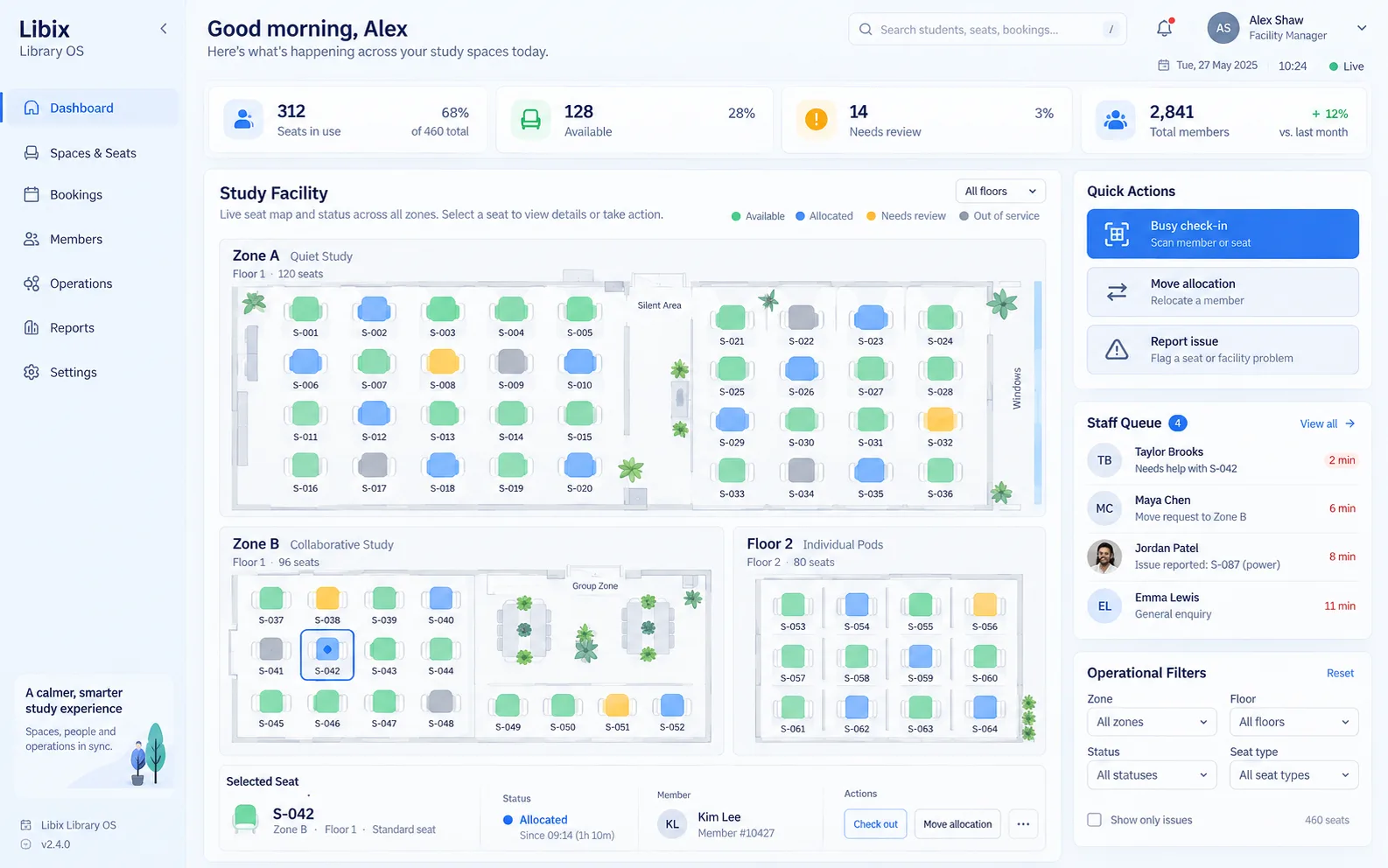
The busy check-in moment
During a busy check-in, the manager needs to find the right area, understand which seat is currently available, confirm the member and shift, and make a deliberate allocation change. The member-facing result and the operational record need to agree; the screen should support that conversation rather than hide it behind a generic capacity number.
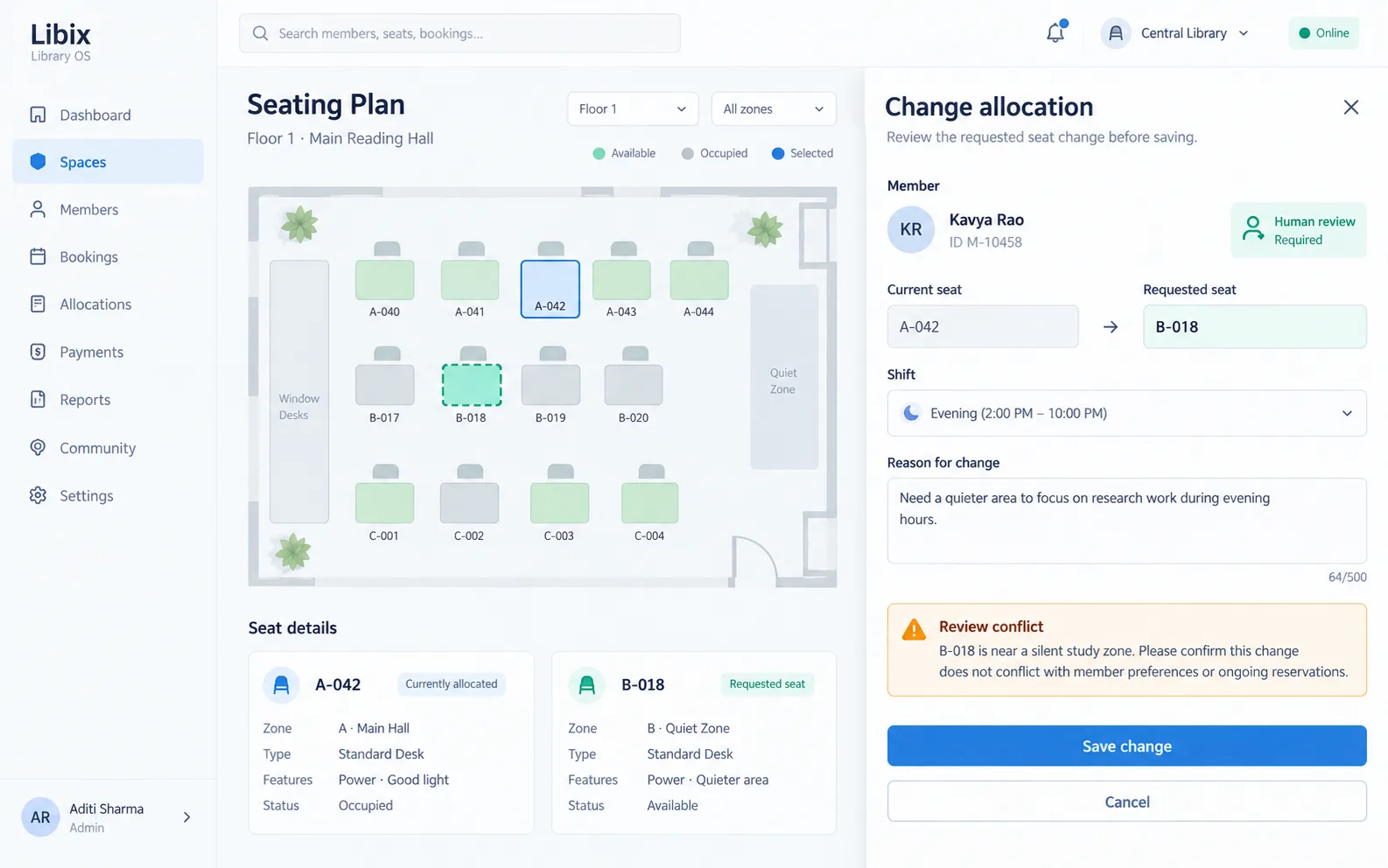
Focused allocation review
The manager can see the current seat, requested seat, shift, reason and a conflict prompt together. This is the point where roles and supported permissions matter: a visible suggestion still needs responsible staff review.
How the work fits together
This workflow keeps location, people, access and follow-up connected. Zone and floor behavior should be confirmed against the supported Libix configuration.
01
Start with the supported zone, floor, seat map or operational filter that matches the staff question.
02
Check the member, seat, shift and status together before a change is proposed.
03
A responsible staff member checks availability, conflicts, permissions and the member-facing consequence.
04
Record the supported change, then use reporting or the next operational view to keep the work traceable.
Capabilities by question
The right workflow depends on your configured modules, roles and supported behavior. Use these questions to structure a product review.
Large facilities become easier to navigate when staff can identify the area and current seat state.
Evaluation view: Use the supported seat-map, zone or floor context, then inspect the selected seat before acting.
A manager may need only one zone, shift, status or issue rather than the whole facility at once.
Evaluation view: Apply the available operational filters and confirm which records remain in scope.
Reception, floor staff and owners may have different responsibilities and access.
Evaluation view: Review supported staff roles and permissions before assigning allocation, member or reporting work.
The seat decision needs enough context to avoid mixing a person, shift or payment question.
Evaluation view: Open the supported member and allocation context, then confirm the next action with the responsible user.
A larger operation needs reports that help a manager ask the next question without hiding local detail.
Evaluation view: Compare supported operational summaries and trace the result back to the relevant area or record.

Product-in-use walkthrough
A manager can work through the moment in a few understandable checks:
Busy check-in
A staff member searches for Kavya Rao while the facility is serving members across multiple areas.
Seat context
The current allocation A-042, requested seat B-018 and Evening shift are reviewed together.
Human decision
The responsible user checks the conflict prompt, confirms the member-facing change and saves only when the supported permission allows it.
Fit and decision criteria
Can staff identify a zone, floor, seat or member without scanning unrelated records?
Can the team explain who may review, change and report on a local operational record?
Can a seat, shift, membership or attendance question be traced to the record that explains it?
Connected Libix modules
Seats and shifts explain location, memberships and attendance explain people, fees explain account status, staff roles explain responsibility and reporting helps an owner ask the next question. Review the study-library management solution, the seat management page, shift management or return to the Solutions hub.
Questions for evaluation
A zone or floor view can make a large facility easier to navigate where that context is supported. Confirm the current seat-map, zone and floor behavior in your Libix setup before treating it as a configured capability.
Staff can start with the supported search and operational filters, then check the member, seat, shift and current status together. Ask for a live walkthrough of the exact reception workflow your team uses.
An allocation change should be reviewed against the current seat, requested seat, shift and any conflict before saving. The responsible staff member remains part of that decision; confirm the supported workflow and permissions.
No. This page addresses operational complexity rather than an arbitrary seat threshold or performance guarantee. Suitability depends on your zones, routines, roles, records and supported configuration.
Not necessarily. Role and scope can affect what a user can view or change. Review staff roles, permissions and reporting access with the product team before assigning responsibilities.
Bring one busy check-in, one zone or floor question, one seat reallocation and one reporting question. That lets the team demonstrate the local record and the next decision without relying on generic promises.
See the operating workflow
Walk through seat context, staff roles, operational filters, reporting and the supported configuration for your facility.
CodePex Technologies Private Limited - Verify current capabilities and terms with the product team.