Libix Logo· Library OS
  • FAQs
  • Features
  • Pricing
  • Solutions
  • About Us
  • Libix Learning
  • Libix Knowledge
  • Home->Solutions->Software for Growing Study Libraries

    For operators outgrowing manual records

    Software for Growing Study Libraries for Real Daily Operations

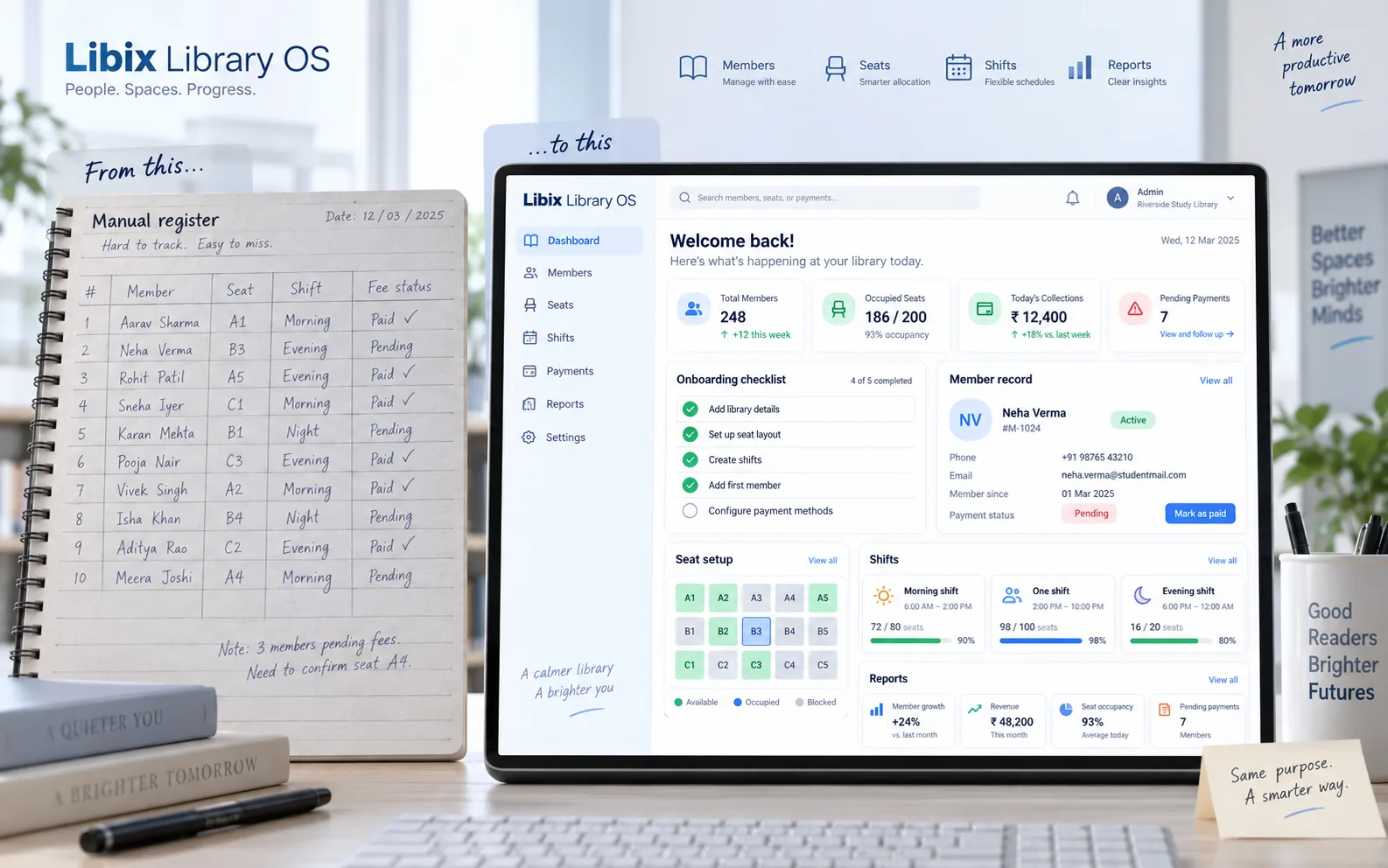
    Move one step at a time from registers and scattered files to a clearer member, seat, shift and payment process. When an owner adds an evening shift, Libix helps the team inspect the connected record before deciding what changes next.

    See the complete solution
    Libix Library OS before and after view from manual records to connected study-library operations

    The next-shift moment

    An owner adds an evening shift and needs one clear record.

    The decision is not just a new time on a notice board. Staff need to know which members can use the evening window, which seats are available, what plan applies, whether payment status is current and what should appear in the next report. A reliable process lets the owner make that change deliberately.

    The operating question: can the team add the next shift without creating a second version of the member and payment record?

    Focused shift setup

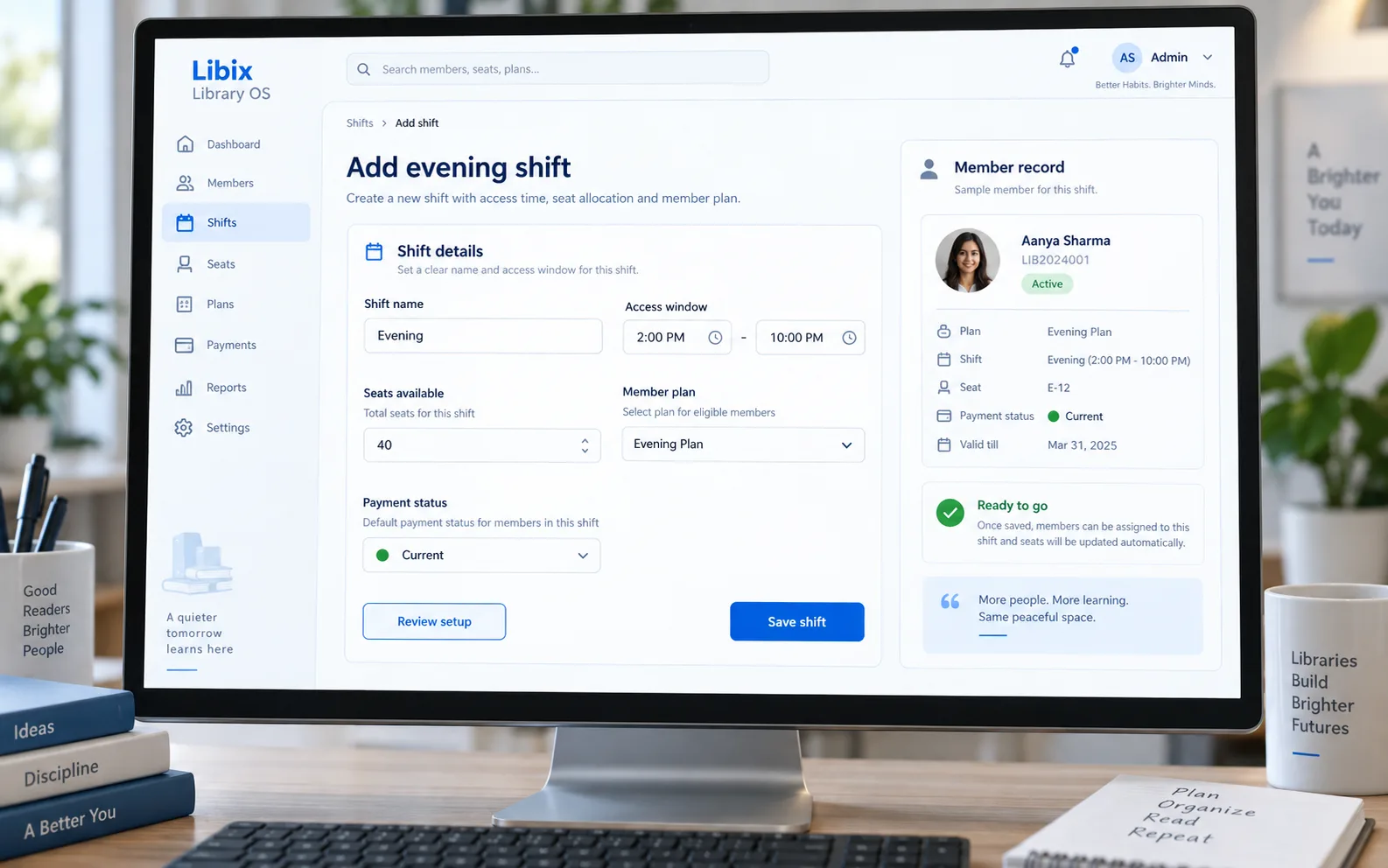
    Review the evening setup before it becomes daily work.

    The decisive screen keeps the shift name, access window, seat availability, member plan and payment context together. A user can review the setup, then save it according to the configured permissions and operating policy.

    Libix Library OS shift setup with evening access window, seats, plan and payment context

    How the work fits together

    Adopt the next process in a sequence your team can explain.

    The workflow keeps adoption practical: understand the current record, set the supported operating model, add the shift and inspect what the next report or follow-up needs to show.

    01

    Capture the current process

    Identify the member, seat, shift, payment and report questions that are currently spread across registers or files.

    ->

    02

    Set the operating model

    Review the supported library details, plan, seat setup and access windows before adding a new routine.

    ->

    03

    Add the next shift

    A responsible user checks the evening shift, available seats, member plan and payment context before saving.

    ->

    04

    Check the record

    Use the supported report or operational view to confirm what changed and what staff should follow up next.

    Capabilities by question

    Give a growing operator a clear next action.

    The safe starting point is the workflow your team can verify. Import, plan, seat and report behavior should be confirmed against the current supported setup.

    01

    Where does onboarding begin?

    A small operator needs a clear first step rather than another system that requires every process to be redesigned at once.

    Evaluation view: Review the supported library details, roles and initial setup sequence with the product team.

    02

    Can member data be brought across?

    Existing names, plans and payment context may be important, but the safe route depends on the supported import or onboarding method.

    Evaluation view: Bring a representative data sample to the demo and confirm the current supported approach before promising migration.

    03

    How are plans and seats connected?

    A new seat is useful only when its plan, access window, member context and payment status are understandable.

    Evaluation view: Inspect the supported plan and seat setup, then verify the resulting member-facing record.

    04

    What changes when a shift is added?

    An evening shift affects access timing, available seats, staff work and the records used for follow-up.

    Evaluation view: Review the shift details and related seat/member context before saving the operational change.

    05

    Which report answers the next question?

    Growth creates more questions about members, occupancy, collections and follow-up—not just more rows.

    Evaluation view: Open the relevant supported report and trace its result to the record a staff member must act on.

    Small functional Indian paid study space preparing more seats and an evening shift

    Product-in-use walkthrough

    One owner decision, one connected member record.

    A practical walkthrough for a library moving past its manual process:

    Current member

    Aanya Sharma is already connected to a plan, seat, shift and current payment status.

    Evening setup

    The owner reviews the 2:00 PM–10:00 PM window, available seats and the plan that should apply.

    Next follow-up

    The team saves the supported change, then checks the relevant report or member view instead of creating a parallel note.

    Fit and decision criteria

    Choose a process your growing team can keep consistent.

    A clear starting point

    Can the owner identify the first member, seat, shift or payment process that should become structured?

    A staged operating model

    Can the team add plans, seats or shifts in an order that matches how members actually use the facility?

    A record people trust

    Can staff find the same member and payment context when the owner is not standing at reception?

    Connected Libix modules

    Growth becomes easier to explain when daily records stay connected.

    Memberships and fees explain the member relationship, seats and shifts explain access, attendance adds daily context, staff roles clarify responsibility and reporting helps the owner inspect what changed. Review the study-library management solution, the membership management page, shift management or return to the Solutions hub.

    Questions for evaluation

    Ask what should become reliable first.

    Can I start with one shift and add another?+

    A growing library can review a new evening shift alongside its access window, seat setup, plan and member records. Confirm the current shift configuration and permissions in a Libix walkthrough before changing your operating policy.

    Can existing member data be brought into Libix?+

    Do not assume an import path or a particular file format. Bring your current member data to a demo and ask the product team to confirm the supported onboarding or migration approach for your records.

    What should I set up before adding seats?+

    Clarify the seat layout, membership plan, access window, staff responsibility and payment record that should agree when the new seats become available. Review the supported setup in the order your team will use it.

    How does Libix help replace a manual register?+

    It gives the team connected places to review members, seats, shifts, fees, attendance and reports instead of relying on one paper or spreadsheet view. The exact rollout still depends on the configured modules and your operating process.

    Can I test the workflow before committing?+

    Use the current Libix trial and demo routes to test the records and daily actions that matter to your facility. Confirm current trial terms, plan behavior and any setup assistance with the product team.

    What should a growing-library demo cover?+

    Show one current member, one payment status, the existing shift, the proposed evening shift and the seat decision that connects them. Ask how the next report or follow-up would be found by staff.

    See the adoption workflow

    Bring one manual process and one new-shift question to a Libix demo.

    Walk through onboarding, member records, plans, seats, shifts, payment context and the supported reports that matter to your next stage.

    Review pricing

    CodePex Technologies Private Limited - Verify current capabilities and terms with the product team.

    Libix is the simplest library management software for modern libraries in India. Built to help library owners focus on their members instead of spreadsheets.

    CIN : U93000UP2017PTC091269
    URN : UDYAM-UP-50-0143487
    Privacy Policy·Terms & Conditions·Refund Policy·Trial Policy·Disclaimer·

    Libix is a proud product of CodePex Technologies Private Limited.
    © 2026 Libix · All rights reserved.