
Which lockers exist?
Staff need a dependable inventory before they can answer an availability question.
Evaluation view: Use the current configured locker records and verify how codes, locations, states and history are represented.
For paid study libraries offering lockers
Allocate a locker to the right member, compare the requested period with an existing allocation and give staff a clear availability question to review. Libix brings locker context closer to the member and membership records without treating a locker like a seat.
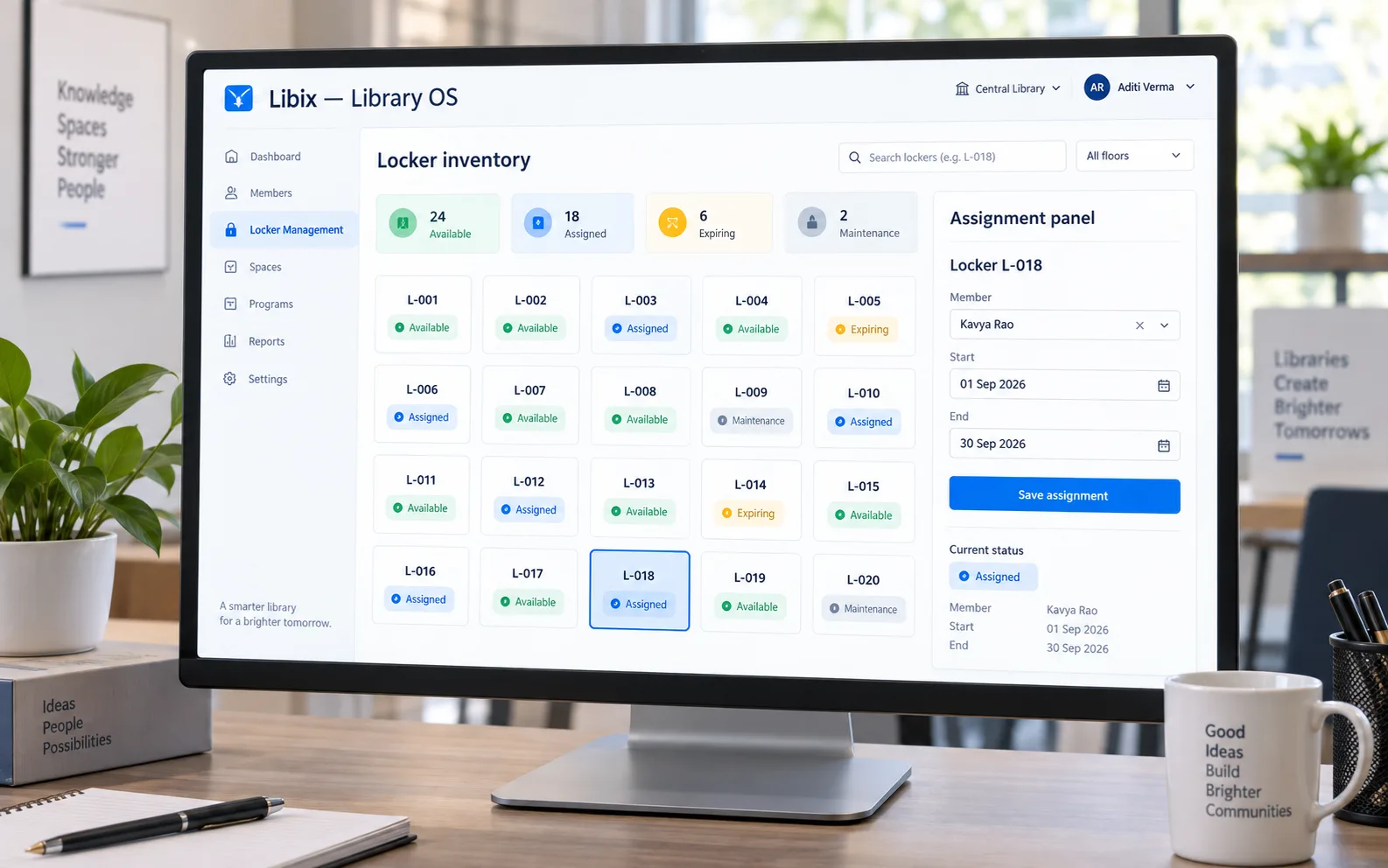
The reception-desk situation
A member requests a locker for a membership period while another allocation expires. Staff need to identify the locker, compare the dates, understand who currently has it and decide whether to assign another locker, confirm after expiry or follow the supported review process.
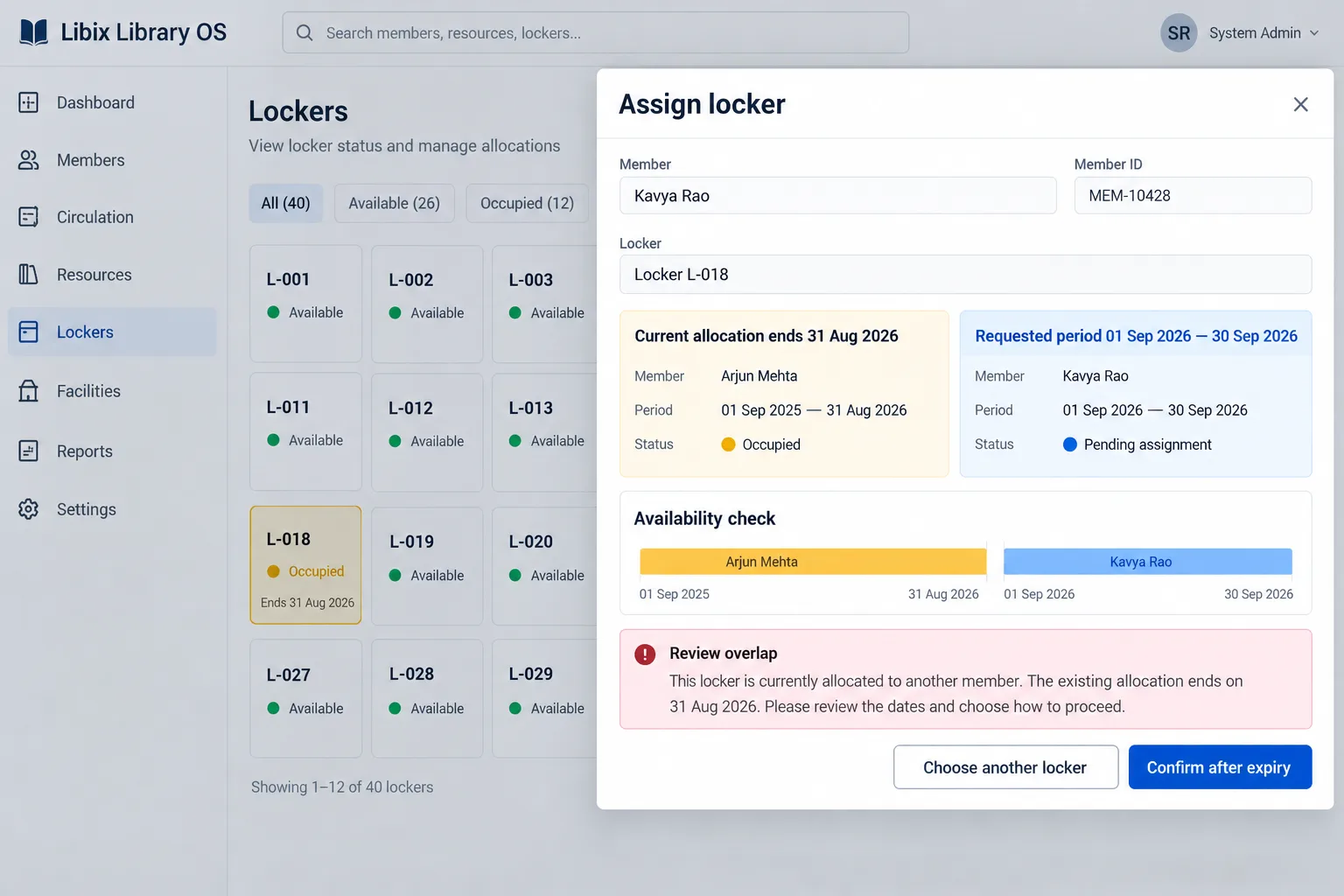
Focused allocation review
The decisive question is temporal: does the requested member period overlap the current allocation, or does the current allocation end before the new period begins? Keep that decision visible and human-reviewed.
How the work fits together
The workflow below is deliberately explicit: inventory and dates provide context, but staff still decide what the operation permits and what the member should be told.
01
Start with a stable locker code and the physical location or area that staff recognize.
02
Review whether the locker is available, assigned, expiring, blocked or otherwise requires staff attention.
03
Place the requested member period beside the existing allocation or release date before confirming.
04
Assign, choose another locker, confirm after expiry or follow the supported human review process.
Capabilities by question
The current repository supports locker-related operating concepts and policy language; confirm the exact dedicated screens, permissions and actions in the live product before making a capability promise.
Staff need a dependable inventory before they can answer an availability question.
Evaluation view: Use the current configured locker records and verify how codes, locations, states and history are represented.
A vacant-looking locker may be blocked, under maintenance or still tied to an active period.
Evaluation view: Review the supported state and current allocation context before promising it to a member.
The member relationship must be visible without confusing locker ownership with membership status.
Evaluation view: Confirm the member and allocation period in the current workflow, then preserve the decision context.
An expiring allocation can affect the next member request and the staff handover.
Evaluation view: Compare start and end dates and keep the release responsibility explicit.
A locker fee, deposit or refund may follow different rules from a seat or membership charge.
Evaluation view: Verify the linked fee and payment behavior instead of assuming every locker includes the same financial treatment.

Product-in-use walkthrough
Use this sequence to discuss the locker decisions your own reception process needs to support:
Find the resource
Staff locate locker L-018 and review its current operational state.
Compare the periods
Kavya Rao requests 01 Sep 2026 to 30 Sep 2026 while the current allocation ends 31 Aug 2026.
Explain the next step
Staff confirm after expiry, choose another locker or follow the documented review process rather than creating an overlapping promise.
Fit and decision criteria
Can staff identify every serviceable, blocked, maintained or retired locker within the right branch or area?
Can the team compare requested, active, expiry and release dates before confirming an allocation?
Can staff explain who reviews a conflict, who handles physical clearance and where the decision is recorded?
Connected Libix modules
Memberships provide the access context, seats and shifts describe study-space capacity, fees describe applicable financial records and lockers describe storage allocation. Review the broader study-library management solution, the membership-management page or return to the Solutions hub.
Questions for evaluation
Locker assignment is a useful operational relationship to evaluate alongside a member and membership period. Confirm the current Libix locker workflow, permissions and assignment history during a product demonstration before treating it as an available live capability.
An availability question needs the locker, current allocation, end date and any maintenance or blocked state to agree. Ask the product team to demonstrate the current availability view and how conflicting periods are reviewed.
No. A seat supports study-space capacity and a locker supports storage. They may relate to the same member or period, but their identity, state and release decisions should remain distinct.
Do not assume that expiry alone clears a physical locker. The operator should verify the documented release, inspection and access-return process and preserve the previous allocation history.
Charges may be relevant where lockers are part of a paid service, but charge, deposit, payment and refund rules are separate financial concepts. Confirm the configured fee and document workflow for your operation.
Bring one available locker, one active allocation, one allocation ending soon and one maintenance or blocked case. Ask staff to explain assignment dates, conflicts, release responsibility and the related member record.
See the locker workflow
Walk through inventory, availability, member assignment, dates and any related fee or release questions with the people who run your study-library reception.
CodePex Technologies Private Limited - Verify current capabilities and terms with the product team.