
What was charged?
Staff need the invoice context before they can explain a member balance or payment request.
Libix view: Keep the fee event, member, plan, amount and invoice number together.
For reception teams, operators and owners
Connect the moment a fee is charged to the amount paid, the balance that remains and the receipt a member receives. Libix keeps documents and payment context together without blurring an invoice, a payment or a receipt into one unexplained record.
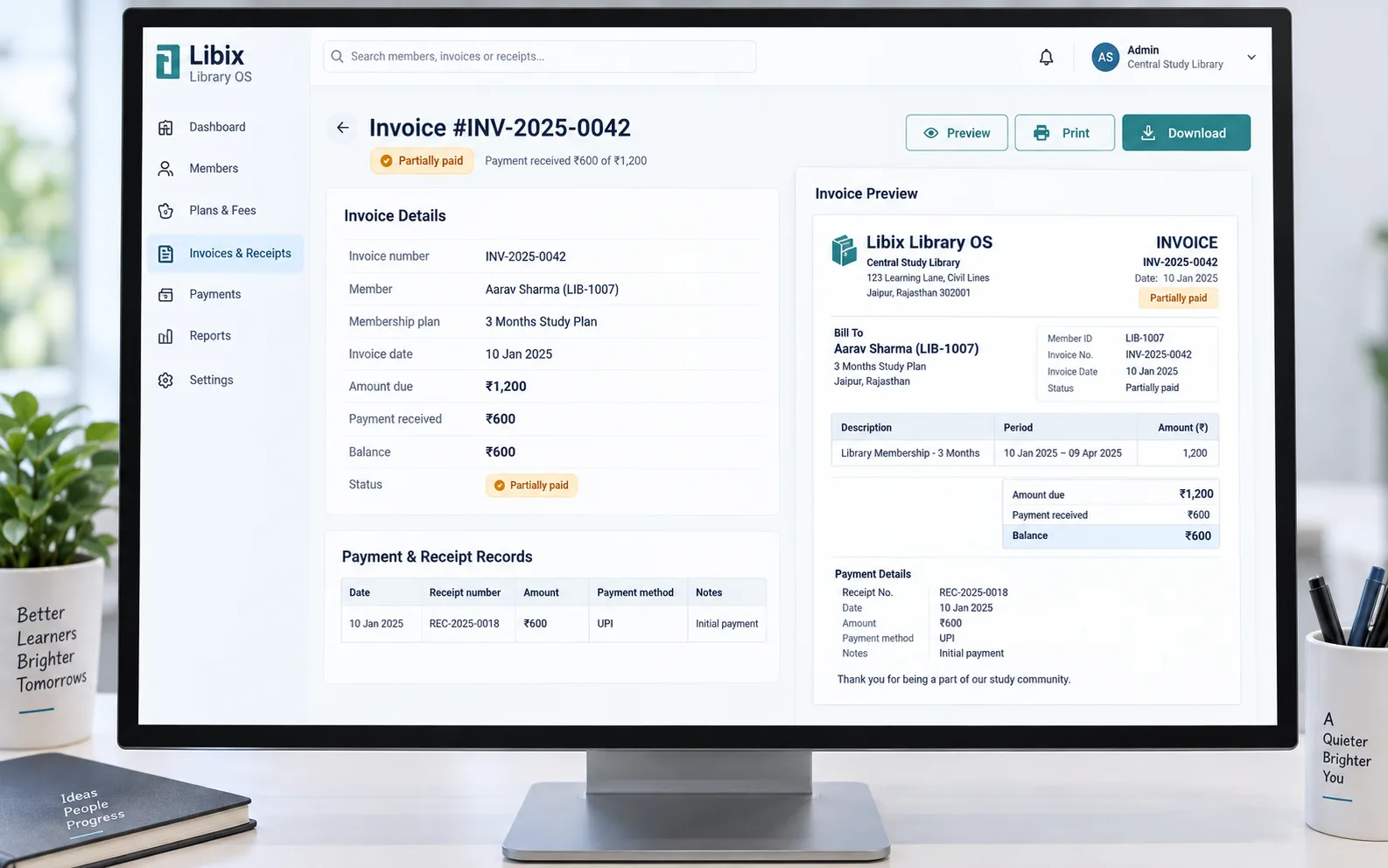
The reception-desk question
A member is charged ₹1,200, pays ₹600 and asks for a receipt. Staff need to identify the right invoice, allocate the payment, show the remaining balance and issue the supported receipt record without manually reconstructing the story.
Focused document view
The focused workflow puts the invoice number, member, charge, payment received, balance and receipt reference in one reviewable place. Staff can then use the supported preview, print or download action.
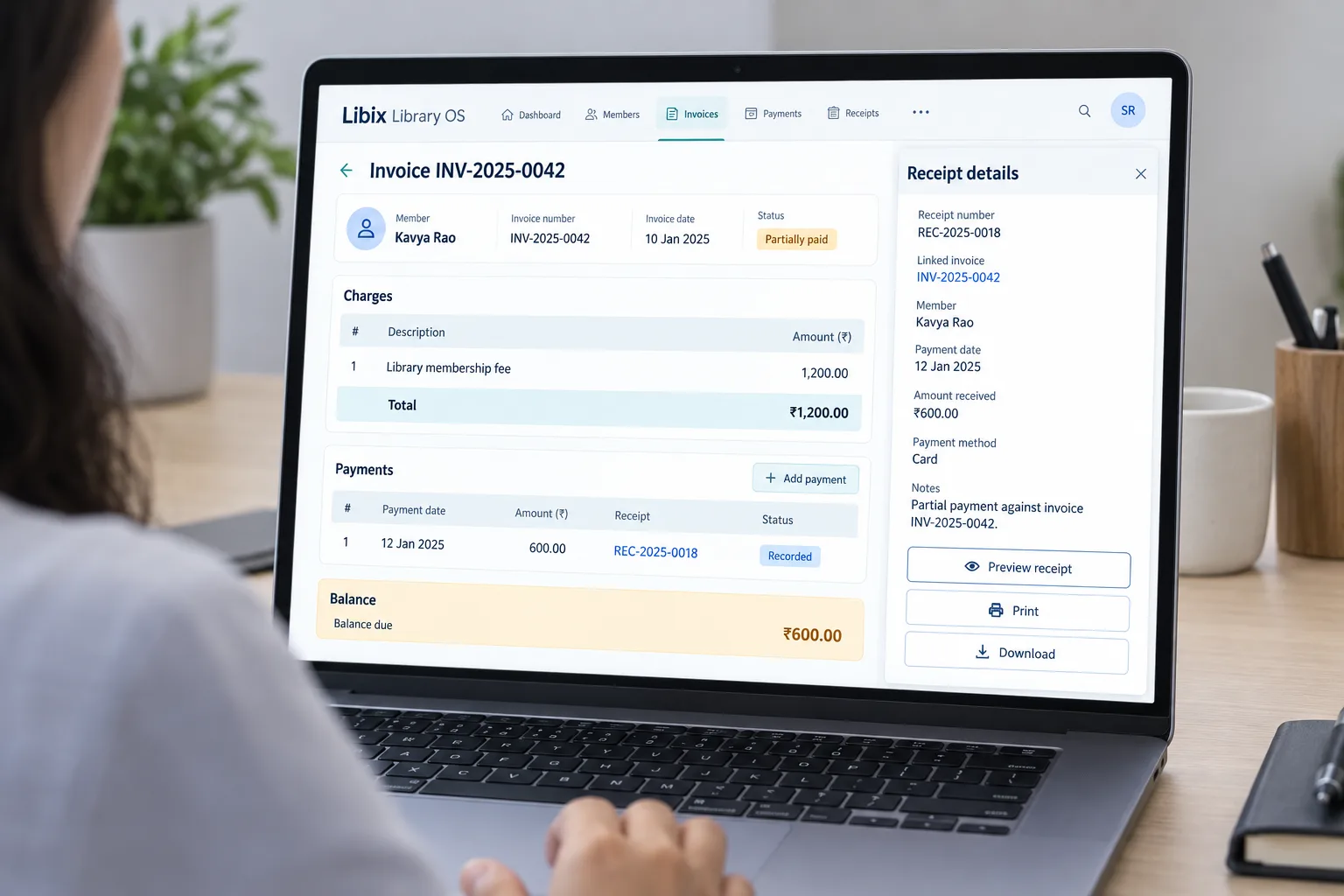
How the document lifecycle fits together
A document workflow is useful when the next staff member can see what triggered it, what was received and what action remains.
01
Start with the member, plan or fee event that needs a document and a clear amount.
02
Apply the amount received to the right invoice while keeping any remaining balance visible.
03
Create a receipt that reflects what was actually received, not what was merely charged.
04
Preview, print or download the supported document so staff and members have a usable reference.
Capabilities by question
Invoice and receipt workflows should reduce explanation gaps across staff handover, member queries and owner review.
Staff need the invoice context before they can explain a member balance or payment request.
Libix view: Keep the fee event, member, plan, amount and invoice number together.
A payment may be full, partial or corrected, so the received amount must remain distinct from the charge.
Libix view: Allocate the payment and show the resulting balance where supported.
The invoice and receipt answer different questions for staff, members and owners.
Libix view: Link the receipt to the relevant invoice or fee record instead of treating documents as loose files.
A reception workflow often ends with a preview, print or download request.
Libix view: Use the supported document action and confirm the resulting format and permissions.
Outstanding amounts need a visible next step rather than an ambiguous payment history.
Libix view: Keep balance, due context and follow-up responsibility understandable to the next staff member.

Product-in-use walkthrough
Use this sequence to evaluate how the reception process handles an everyday document request:
Find the charge
Staff locate the member and fee event so the invoice context is correct.
Record what arrived
The amount received is allocated and the remaining balance stays visible.
Hand over the document
Staff preview, print or download the supported receipt and can explain its relationship to the invoice.
Fit and decision criteria
Can staff distinguish a charge, an invoice, a payment and a receipt when answering a member?
Can the workflow show what was received and what remains without manual reconstruction?
Can the team verify numbering, fields, permissions and tax-related requirements for its own operating context?
Connected Libix modules
Invoices and receipts depend on the fee event, member, plan and payment record. They complement—not replace—the broader fee and collections workflow. Review the study-library management solution or return to the Solutions hub.
Questions for evaluation
An invoice should be created at the supported billing or fee-charge trigger in your operating workflow. Confirm the current Libix trigger, numbering behavior and correction permissions with the product team rather than assuming a tax-specific document flow.
Yes, a receipt workflow can record the amount actually received while keeping the remaining balance visible. Confirm how the current setup allocates partial payments and links the receipt back to the invoice or fee record.
An invoice describes the charge or amount expected; a receipt records money received. Keeping both visible helps staff explain a fully paid, partially paid or outstanding record.
The document workflow can include preview, print and download actions where supported. Review the current permissions, document format and device behavior during a product demonstration.
No. Invoice and receipt document handling is distinct from tax-compliance configuration. Confirm your required tax treatment, fields and statutory obligations with your accountant and the product team.
Bring one new fee charge, one partial payment, one correction and one request to print or download a receipt. Ask staff to explain the relationship between the invoice, payment allocation, balance and receipt.
See the document workflow
Walk through invoice creation, payment allocation, receipt generation, balance visibility and document handover with the people who manage daily collections.
CodePex Technologies Private Limited - Verify current capabilities and terms with the product team.