Libix Logo· Library OS
  • FAQs
  • Features
  • Pricing
  • Solutions
  • About Us
  • Libix Learning
  • Libix Knowledge
  • Home->Solutions->Cloud Study Library Management Software

    For browser-accessed daily work

    Cloud Study Library Management Software for Real Daily Operations

    Give authorized staff and owners a browser-accessed workspace for members, seats, shifts, fees and reports. An owner can review a branch dashboard away from reception while staff continue the local work, with role and workspace scope kept visible.

    See the complete solution
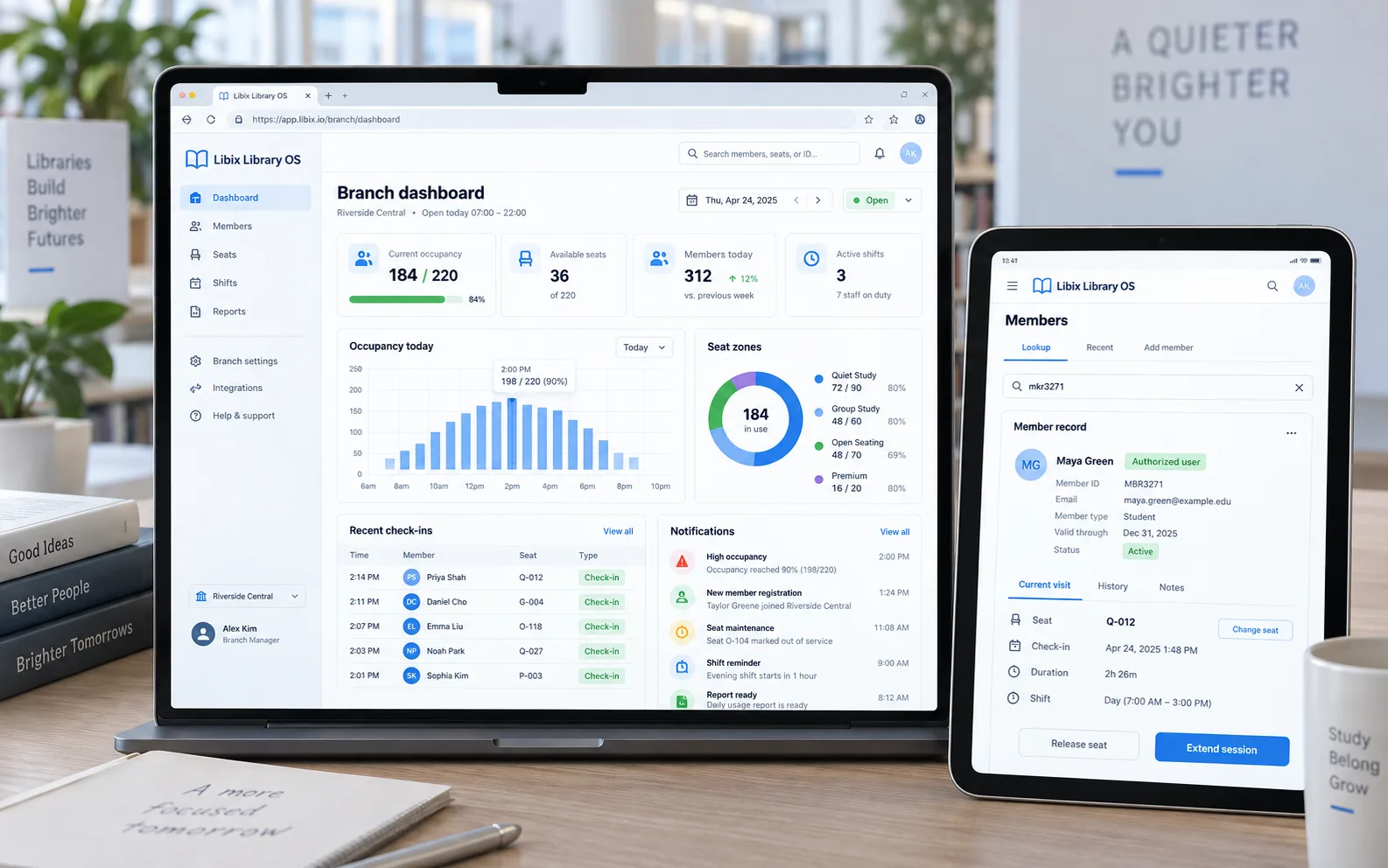
    Libix Library OS branch dashboard on a laptop and member lookup on a tablet

    The away-from-reception moment

    An owner checks the branch dashboard while staff keep working.

    The owner wants to understand today’s branch picture without interrupting reception. Staff are still finding a member, checking a seat and recording the local action. The dashboard, user role, selected workspace and current record need to agree before the owner treats a summary as a reason to intervene.

    The operating boundary: remote access should improve visibility, not make permissions or branch context ambiguous.

    Focused browser workflow

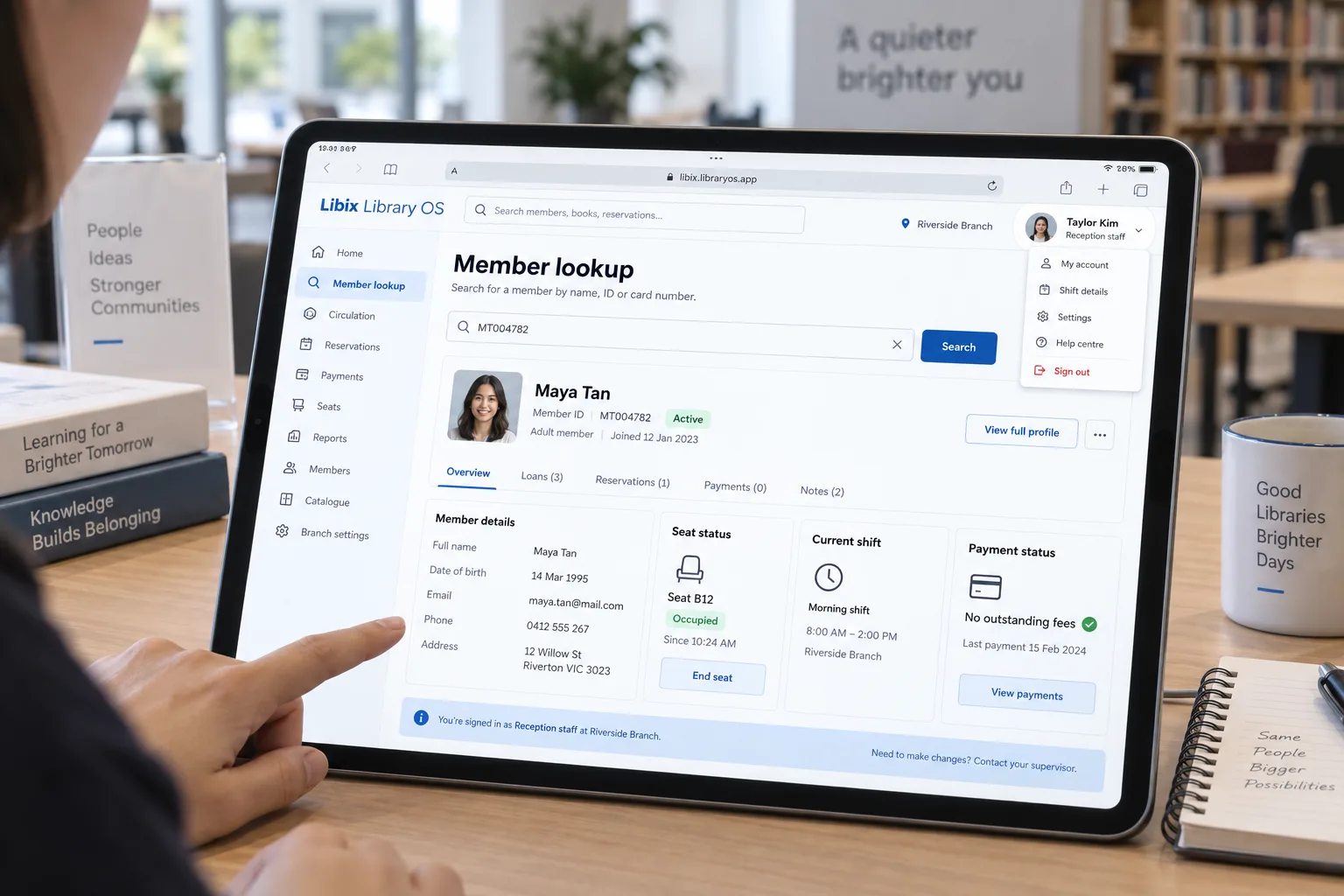
    Find the member and know who is signed in.

    A staff lookup becomes more useful when the browser session shows the active branch, user role, member record, seat status, shift and payment context together. The person signed in still needs the right permission for any change.

    Libix Library OS member lookup on a tablet showing role, branch, seat, shift and payment context

    How the work fits together

    Connect access, responsibility and the current record.

    A browser-based workflow is useful when the team can explain how a user reaches the workspace, what scope is active, which record is being handled and what happens when the connection or permission boundary changes.

    01

    Open the workspace

    Use a supported browser and authorized account to reach the current study-library workspace.

    ->

    02

    Apply role and scope

    Confirm which user, branch or operating area the session is allowed to view or change.

    ->

    03

    Work on the record

    Search the member, seat, shift, fee or attendance context that staff need for the current decision.

    ->

    04

    Review and sign out

    Confirm the visible result, hand over the next action and end the session according to your access policy.

    Capabilities by question

    Test the access model against daily work.

    Cloud is an access and deployment question, not a reason to assume offline mode, universal browser support, automatic backups or unrestricted visibility.

    01

    Can staff reach the workspace?

    Browser access matters only when the right device, account and connection reach the current records.

    Evaluation view: Open the supported Libix route on the devices your reception and owner teams use, then check the actual workflow.

    02

    Who can see or change it?

    Owners, branch managers and reception staff may need different responsibilities.

    Evaluation view: Review the configured role and permission behavior before giving a user access to a member, seat, fee or report view.

    03

    Which workspace is active?

    A remote owner needs clear branch or organization context before interpreting a dashboard.

    Evaluation view: Inspect the selected branch or workspace scope and confirm how local records are separated or summarized.

    04

    Does the device fit the task?

    A tablet may be useful for a lookup while a larger screen may suit owner review and reporting.

    Evaluation view: Test supported desktop, laptop and tablet browsers with the exact member, seat and report tasks your team performs.

    05

    What happens when the connection is lost?

    A cloud workflow must have a clear operating boundary when current records cannot be reached.

    Evaluation view: Confirm connection requirements, staff fallback procedures and the product team’s current recovery guidance; no offline promise is made here.

    Modest Indian study-library reception with staff using a laptop while members continue daily work

    Product-in-use walkthrough

    One branch question, two responsible users.

    A practical browser-access sequence for a normal working day:

    Staff lookup

    Reception searches for Maya Tan from the active Riverside Branch workspace and checks her current seat, shift and payment status.

    Owner review

    The owner opens the supported branch dashboard from an authorized browser session and reviews the same operating context at summary level.

    Clear handoff

    The owner asks the local staff member to handle the member-facing change when the account role or branch permission requires it.

    Fit and decision criteria

    Choose browser access that matches your operating boundaries.

    Access clarity

    Can every user explain how they sign in, which workspace they are viewing and what they may change?

    Device reality

    Have reception, managers and owners tested the exact browser and screen sizes they will use daily?

    Connection plan

    Does the team know what to do when the current records cannot be reached, without assuming offline capability?

    Connected Libix modules

    Remote visibility still depends on connected local records.

    Memberships, seats, shifts, fees, attendance, staff roles and reporting become more useful when the right user can reach the right context. Review the study-library management solution, multi-branch operations, reporting and analytics or return to the Solutions hub.

    Questions for evaluation

    Ask what browser access should and should not change.

    Can I use Libix in a browser?+

    Libix is presented as a browser-accessed Library OS workspace for daily records and operations. Confirm the current supported browsers, account setup and device behavior in a live demo before standardizing your team workflow.

    Does it work without an internet connection?+

    Do not assume an offline mode. The current browser workflow requires a connection to reach the hosted application and current records; confirm any supported offline or recovery behavior directly with the product team.

    Can authorized staff use different devices?+

    A browser workspace can be opened from supported desktop, laptop or tablet devices, but the exact compatibility and role behavior should be checked for your chosen browsers and operating routine.

    Can an owner check a branch away from reception?+

    The owner can review the supported branch dashboard from an authorized browser session while staff continue local work. Confirm workspace scope, permissions and the records available to each role.

    Are backups included?+

    This page does not make a backup or recovery guarantee. Ask the product team to explain the current backup, retention, export and recovery practices before treating them as part of your operating policy.

    How should we evaluate a cloud workflow?+

    Bring one member lookup, one seat or shift question, one staff-role case and one report to a demo. Test the browser, account, scope and daily record behavior on the devices your team actually uses.

    See the access workflow

    Bring one remote owner question and one staff lookup to a Libix demo.

    Test browser access, roles, branch scope, device behavior, connection boundaries and the records your team needs every day.

    Review pricing

    CodePex Technologies Private Limited - Verify current capabilities and terms with the product team.

    Libix is the simplest library management software for modern libraries in India. Built to help library owners focus on their members instead of spreadsheets.

    CIN : U93000UP2017PTC091269
    URN : UDYAM-UP-50-0143487
    Privacy Policy·Terms & Conditions·Refund Policy·Trial Policy·Disclaimer·

    Libix is a proud product of CodePex Technologies Private Limited.
    © 2026 Libix · All rights reserved.